

Сүрөттөө
Shop Explorer is a complete WooCommerce store management plugin that turns the default WooCommerce admin panel into a clean, fast, all-in-one cockpit with unifies product editing, order management, customer relationship management, invoice generation, shipment tracking (151 carriers), coupon management, expense tracking, review moderation, RFM customer analytics, and AI-powered revenue insights like Shopify store in WooCommerce. Every tool you need to run your store is one click away — no switching between plugins.
Features
📊 Analytics Dashboard
A live, interactive analytics dashboard that updates without leaving the page:
- Revenue analytics with daily, weekly, and monthly breakdowns
- Interactive AreaChart with teal gradient fill (powered by Recharts)
- Total Orders, Revenue, and Average Order Value (AOV) KPI cards
- Order trend visualization spot seasonal peaks before they happen
- Top-performing products ranked by revenue and units sold
- Customer type widget new vs. returning customer ratio
- Customer segments widget behavioral and spend-based groupings
- Order locations globe interactive 3D visualization of where orders come from
- Low stock widget alerts for products approaching zero inventory
- Recent orders widget with status indicators
- Conversion funnel chart add to cart checkout purchase drop-off
- Cart interactions analytics add, remove, and update events per product
- Incomplete orders section abandoned checkout recovery tracking
- Extended KPI cards with period-over-period growth indicators
- Order rates widget processing vs. completed vs. refunded breakdown
- Custom date filtering: today, yesterday, last 7/15/30 days, or custom range using Ant Design RangePicker
- AI Revenue Analysis panel AI-generated insights on sales trends and conversion opportunities
- Revenue vs Orders correlation chart — a dual-axis AreaChart overlaying your revenue curve against your order volume curve so you can immediately spot periods where orders were high but revenue was low (or vice versa), revealing pricing and mix shifts at a glance
🛒 Bulk Product Editor
A fast, full-featured product editing engine replacing WooCommerce’s limited built-in bulk editor:
- Bulk price updates with regular price, sale price, or percentage increase/decrease
- Bulk stock management with set quantities, fix stock status, resolve low-stock issues
- Bulk category and tag assignment across thousands of products at once
- Bulk status changes with publish, draft, privatize, toggle featured status
- Variation bulk editing with update variation-specific pricing, stock, and attributes at scale
- Batch processing with configurable batch sizes (default 5,000 products)
- Real-time progress tracking with live success/failure counts and cancel mid-run
- Product filtering by type, price range, stock, category, tag, attribute, featured, or on-sale status
- Search by product name, SKU, or description
- Sort by date, name, price, stock, or SKU (ascending/descending)
- Inline price editing click any product’s price in the list to edit regular and sale price side-by-side in a popover; saved instantly without opening the full editor
- Inline stock editing click the stock quantity cell to update a product’s inventory count directly in the list row
- Inline status and stock status dropdowns change publish status or stock status (In Stock / Out of Stock / On Backorder) with a single click from the product list
- Progressive background loading the first page of products loads instantly; remaining pages are fetched silently in the background and cached; navigating to any subsequent page is instant because the data is already there
- Cross-page persistent selection select products on page 1, navigate to page 2, select more your full selection is preserved across all pages; bulk actions apply to every selected product regardless of which page you’re on
- Cost of Goods Sold (COGS) field each product has a
_shopex_cogsmeta field in the Product Editor to track your actual product cost alongside the selling price, laying the groundwork for accurate profit margin reporting - Attribute manager create and manage product attributes
- Brand selector assign brands to products
- Category and tag management panels
- Variation generator create variations from attribute combinations
- Image uploader with WordPress Media Library integration
- Custom fields manager
- Drag-to-scroll bulk editor table click and drag horizontally and vertically inside the bulk editor to navigate wide tables without touching the scrollbar
📦 Order Management
Handle your entire order workflow without clicking through individual order screens:
- Complete order list with advanced search and multi-criteria filtering
- Filter by status, date range, price range, item count, customer name/email/phone, payment method, and product
- Date range presets using Ant Design RangePicker (consistent with orders and analytics)
- Bulk order status updates — move hundreds of orders in one action
- Bulk order export to CSV with custom field selection
- Inline order notes — add, edit, and delete without leaving the list
- Full order detail panel — customer info, payment, shipping, line items, notes, and refunds
- Bulk Order Editor — common field edits (status, billing, shipping, notes) across multiple orders at once, with individual-row mode for per-order changes
- Order create dialog — create new WooCommerce orders directly from the dashboard
- Order edit dialog — modify existing order details inline
- Inline order status change — change any order’s status directly from the list row with a single-click dropdown; no need to open the full order
- Progressive background loading — the first page of orders loads immediately; subsequent pages are fetched silently in the background so navigating pages feels instant
- Cross-page persistent selection — select orders across multiple pages and apply bulk actions to the entire selection at once; your choices are preserved as you paginate
- Process Refund from Order Details — enter a refund amount and reason directly from the order detail view without going to WooCommerce admin
- Order note edit and delete — notes on the Order Details page can be edited inline or deleted, not just added
- Advanced filters — payment method, transaction ID, coupon, product, customer type, and more (PRO)
- Customer notification sender — bulk email notifications to multiple order recipients
- Drag-to-scroll bulk order editor table — drag to navigate wide tables in the Bulk Order Editor without scrollbars
🧾 Invoice Generator
A complete invoice and PDF printing system:
- 6 invoice templates:
- Minimal clean white, simple table layout
- Modern gradient accents, rounded corners, modern typography
- Classic traditional layout with professional borders
- Corporate multi-column executive layout
- Premium luxury gold accents, serif typography
- Elegant minimalist ultra-light typography
- Full invoice settings panel with tabs: Template, Colors, Company, General, Columns, Footer
- Company branding logo, name, tagline, address, phone, email, website, tax ID
- Custom primary/text/accent color pickers per template
- Column toggles SKU, product image, attributes, tax, discount
- Section toggles company logo, tax breakdown, shipping row, discount row, customer notes, payment method, order number
- Invoice numbering custom prefix, start number, padding
- Auto-generation trigger on order status change (configurable statuses)
- Admin download button on WooCommerce order edit page
- Customer PDF download from My Account page customers download their own invoice with one click
- Invoice caching generated PDFs stored in uploads, regenerated only when settings change
- Page size selection (A4, Letter, etc.)
- Footer text and legal text per invoice
- Attachment to WooCommerce order emails (configurable)
👥 Customer Management
A complete customer hub next to your product and order management:
- Full customer database with advanced search and filtering
- Customer profile page lifetime value, purchase history, tags, notes
- Customer Lifetime Value (CLV) calculation per account
- Registration date and last-order date tracking
- Refund total tracking per customer
- Customer notes add, view, delete internal notes on each customer
- Customer tagging (see below)
- Customer editor update customer details inline
- Bulk customer export to CSV
- Inline role management change a customer’s WordPress role directly from the customer list using a single dropdown; assign SE: Fulfillment Staff, SE: Product Manager, SE: Store Manager, or any standard WP role without leaving the page
- Customer quick-view modal click any customer row to see a summary card with avatar, stats (orders, total spent, avg order value), billing and shipping addresses without navigating away from the list
- Order notes on customer profile the customer profile page surfaces order-level customer notes so you can see instructions and special requests across all of that customer’s orders in one place
🏷️ Customer Tagging
Automatic and manual customer classification:
- Automatic rule-based tags:
- VIP Customer high-value spenders
- At-Risk Customer customers showing churn signals
- New Customer first-time buyers
- Loyal Customer repeat purchasers
- Big Spender top percentile by order value
- Discount Hunter primarily coupon users
- Frequent Buyer high order frequency
- Dormant no purchases in a defined period
- Wholesale Buyer bulk order patterns
- International Customer ships outside home country
- Manual tags create and apply custom labels to any customer
- Tag settings configure thresholds for each auto-tag rule (order count, spend amount, days inactive, etc.)
- Customer Tag Badge component visual labels on customer lists and profiles
- Tag filtering filter customer lists by any tag
- Tag Manager view, edit, and delete tags from the Settings > Customer Tagging tab
💰 Expense Manager
Track store operating costs alongside revenue:
- Expense list with search, filter by category, and date range
- Expense categories: Operating, Marketing, Inventory, Shipping, Software, Salaries, Other
- Recurring expense support mark expenses as repeating
- Expense create/edit modal with amount, category, date, and notes
- Expense view modal full detail overlay per expense
- Dashboard KPI cards total expenses, by category breakdown
- Expense editor page full-page editing mode
- CSV export of expense data
- Expense summary widgets integrated into the analytics dashboard
⭐ Review Management
Moderate and respond to WooCommerce product reviews:
- Full review list with status, star rating, author, and product filters
- Filter by: all, approved, pending, spam, trash, and verified-only
- Search reviews by content or author
- Sort by date, rating, or author
- Approve, reject, spam, and trash reviews in one click
- Reply to reviews directly from the dashboard
- Expandable review detail view
- Review settings enable/disable reviews, verified-only mode, star rating requirements, show verified badge
- Bulk review actions approve or trash multiple reviews at once
- Review count badges per status tab
🤖 AI Integration
Shop Explorer connects to the AI provider of your choice and uses it across the entire plugin:
- AI Content Generator : generate product names, descriptions, pricing, SKUs, and stock levels from a single prompt
- **AI Revenue Analysis : turn sales data into plain-language insights about trends, growth patterns, and conversion suggestions
- **AI Generate Button : appears in the Product Editor and Order Editor when AI Integration is enabled
- Supported providers
- Google Gemini (Gemini 2.0 Flash, Gemini 2.5 Flash-Lite, and more)
- OpenAI (GPT-4o, GPT-4o-mini, GPT-4.1, O4-mini)
- Anthropic Claude
- DeepSeek
- X.AI Grok
- OpenRouter (100+ models from multiple providers)
- API key storage encrypted in WordPress database, masked in the UI, never exposed to the frontend
- Provider switcher change providers at any time without losing content
- Model selector choose from all available models per provider
- Generation parameters Temperature slider (Precise Creative) and Max Tokens selector
- Test connection button verify key and model before using AI features
- AI settings save integrated with global Settings save button
- AI Revenue Panel dedicated panel with AI-written analysis of your revenue data
🎟️ Coupon Management
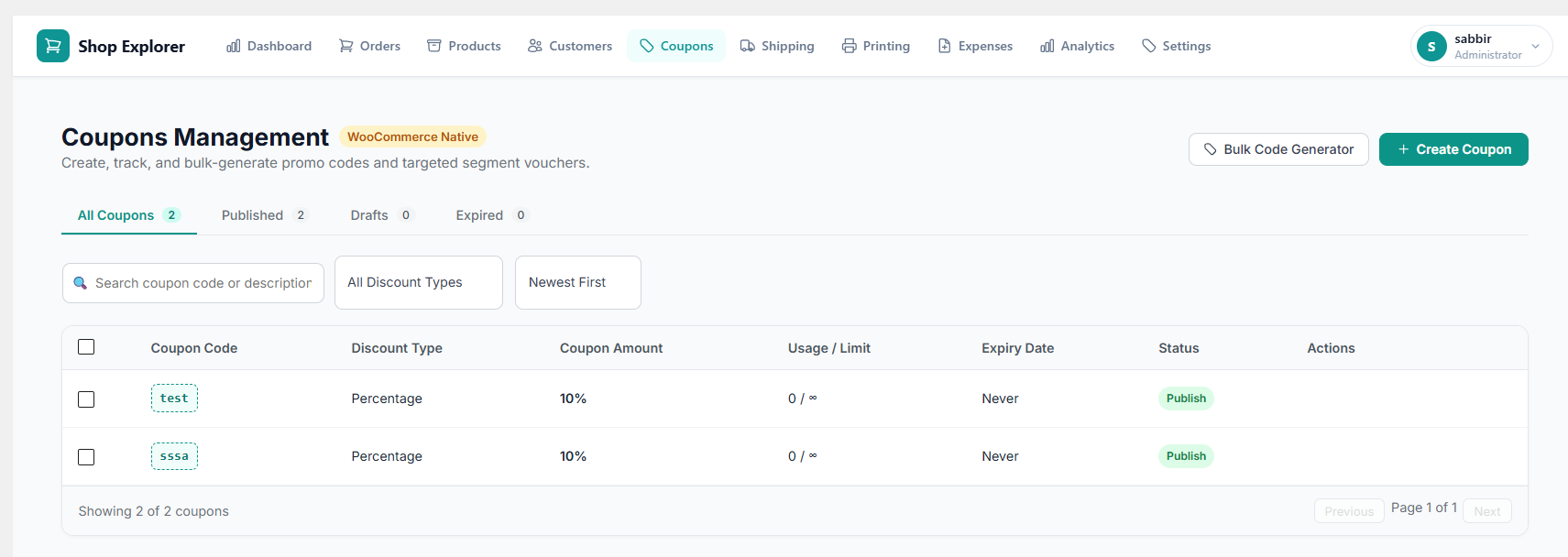
Create, track, and bulk-generate WooCommerce promo codes directly from the Shop Explorer dashboard — no need to visit WooCommerce > Coupons:
- Full coupon list with status tabs: All, Published, Drafts, Expired — with live counts per tab
- Filter by discount type (percentage, fixed cart, fixed product), sort by newest, oldest, code A-Z, most used, or highest amount
- One-click copy of any coupon code to clipboard
- Slide-over Coupon Drawer create or edit coupons without leaving the page: discount type, amount, expiry date, usage limits (per coupon and per customer), minimum/maximum spend, individual use, exclude sale items, product and category restrictions
- Coupon duplication clone an existing coupon in one click
- Bulk Code Generator generate up to 100 unique promo codes in seconds: set a custom prefix, discount type, amount, validity window (days from today), and per-code usage limit
- Target Segment Label tag a coupon batch with a customer segment (e.g. “At Risk”, “VIP”) so you can trace exactly which campaign drove redemptions
- Deep-link from Customer Analytics click “Engage Segment” on any RFM segment card and land directly on the coupon creation drawer pre-filled with the segment name
- Bulk actions: Publish, Move to Draft, Extend Expiry +30 Days, Trash, or Permanently Delete selected coupons
📋 Order Printing & Packing Slips
Print professional fulfillment documents for every order directly from the Shop Explorer dashboard — no extra plugin needed:
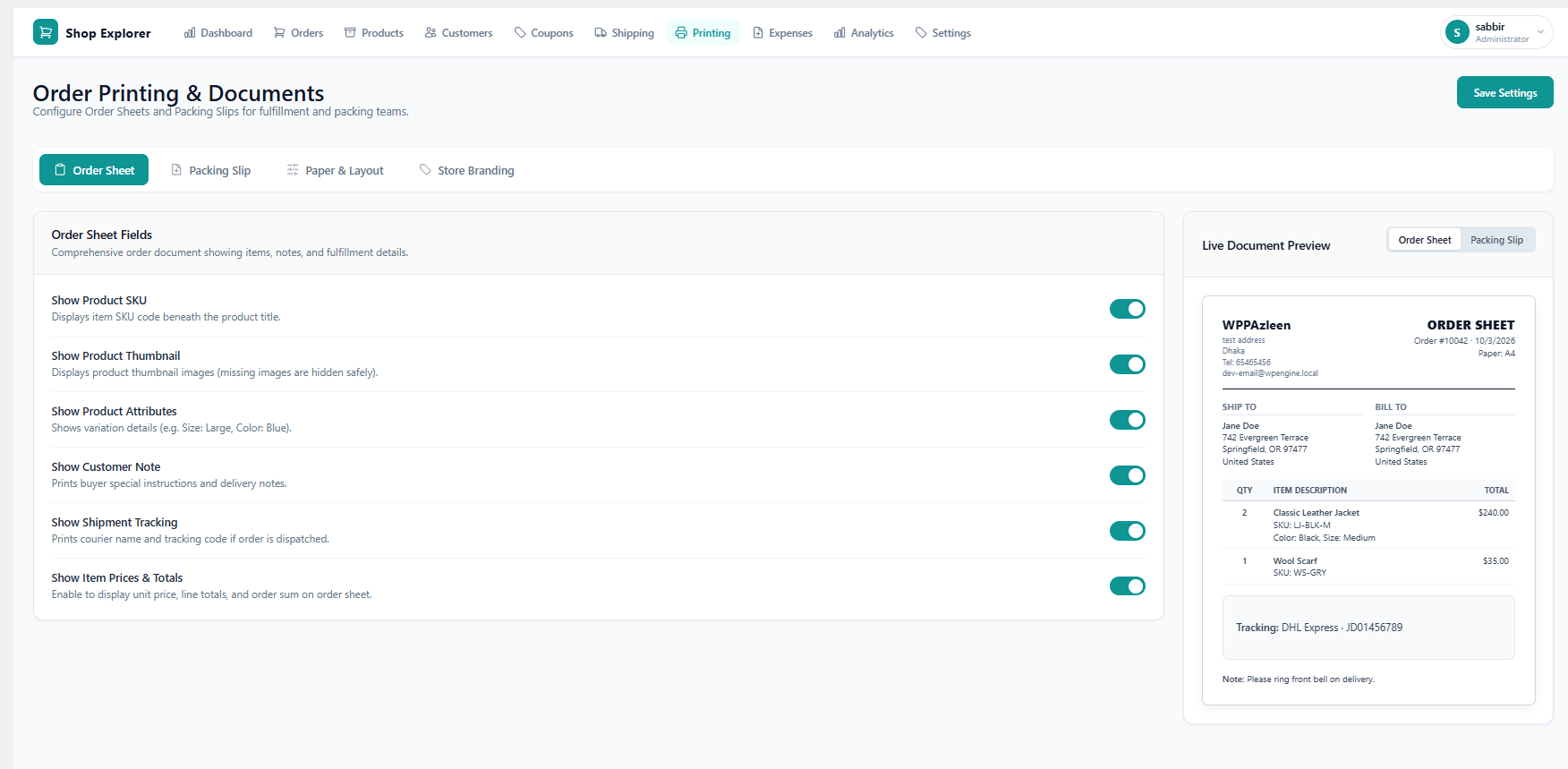
- Order Sheet comprehensive pick-and-pack document showing all order items with configurable fields: product SKU, product thumbnail, variation attributes, customer note, shipment tracking, payment method, shipping method, item prices and line totals
- Packing Slip streamlined warehouse document designed to keep financial details off the packing table: show/hide SKU, variation details, prices, and a custom footer sign-off message
- Paper Size choose ISO A4 (worldwide standard) or US Letter (North America) applied via a clean print stylesheet using browser
window.print() - Store Branding documents automatically pull your logo, company name, address, phone, and email from your Invoice settings enter your details once, use them everywhere
- Live Document Preview see a real-time mockup of how your Order Sheet or Packing Slip will look before printing, including the 50/50 Ship To / Bill To address table
- Print from anywhere Order Sheet and Packing Slip buttons are available in the Order List quick-view modal and on the full Order Details page
- Bulk print print documents for multiple selected orders at once using the WooCommerce order list bulk action
📦 Shipment Tracking & Customer Tracking Portal
Add shipment tracking to any order and let customers follow their parcel without contacting support:
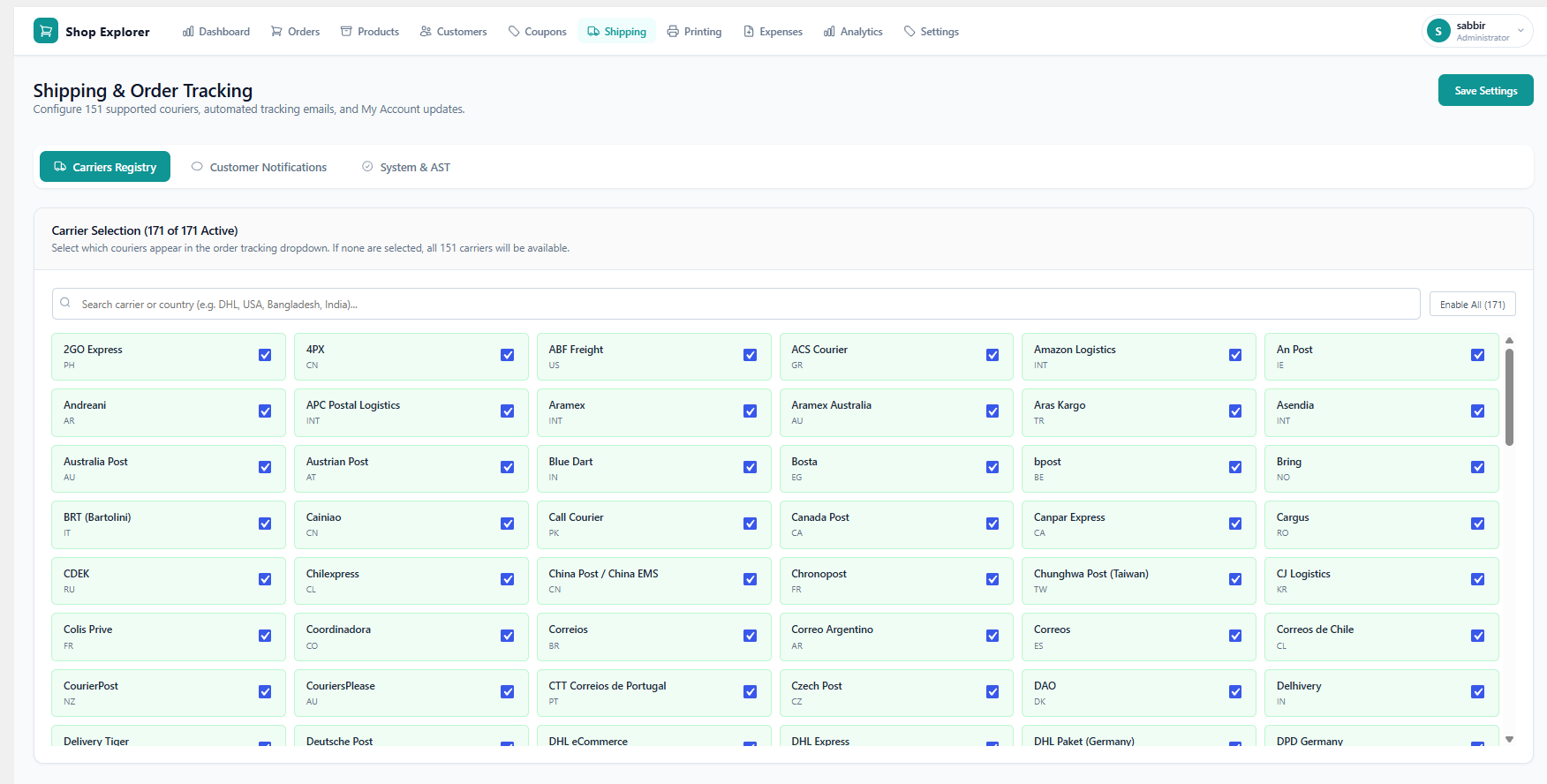
- 151 supported couriers including DHL, FedEx, UPS, USPS, Royal Mail, Aramex, Bangladesh Post, India Post, and dozens more — searchable by carrier name or country
- Add tracking to an order from the Order Details page, the Order Editor, or directly from the Order List
- Carrier auto-URL select a carrier and the tracking link is built automatically from its URL template and the tracking number you enter; no manual URL required
- Per-order tracking card showing carrier name, tracking number, ship date, and a direct “Track on Courier Site” link
- Email notifications include a formatted shipment block inside the WooCommerce customer order email (toggle on/off)
- My Account integration show live tracking details under the customer’s View Order page (toggle on/off)
- Custom tracking message write your own heading and message body with placeholder tags:
{carrier},{tracking_number},{tracking_url},{ship_date},{status}; click any tag to insert it - Live customer preview see exactly how the email and My Account block will look before saving
- Advanced Shipment Tracking (AST) compatibility if AST plugin is active, …
Скриншоттор


Орнотуу
Automatic Installation (Recommended)
- Go to Plugins Add New in your WordPress dashboard
- Search for “Shop Explorer”
- Click Install Now, then Activate
Manual Installation
- Download the plugin .zip file from WordPress.org
- Go to Plugins Add New Upload Plugin
- Upload the .zip file and click Install Now
- Click Activate Plugin
Requirements
- WordPress 6.7 or higher
- WooCommerce 7.0 or higher (must be installed and active)
- PHP 7.4 or higher (PHP 8.x recommended for best performance)
Initial Setup
- After activation, click Shop Explorer in your WordPress admin sidebar
- Your live analytics dashboard loads automatically with your WooCommerce data
- Use the top navigation to switch between Dashboard, Products, Orders, and Customers
- Visit Settings to configure batch sizes, thresholds, and notification preferences
FAQ.KG
-
What does Shop Explorer do?
-
Shop Explorer is a WooCommerce store management plugin that combines bulk product editing, order management, customer management, and AI-powered revenue analytics in a single WordPress admin dashboard. It replaces the need to run separate plugins for each of those tasks.
-
How do I bulk edit WooCommerce products with Shop Explorer?
-
Open Shop Explorer > Products, filter or search for the products you want to change, select them, and choose a bulk action such as updating price, stock, category, or status. A threshold system and validation engine check the change before it writes to your database, and a progress bar shows live results.
-
How does the AI revenue analysis work?
-
The AI revenue analysis reads your live WooCommerce sales data and turns it into plain-language insights about trends, growth, and conversion opportunities, using the AI provider you connect (OpenAI, Google Gemini, Anthropic Claude, DeepSeek, X.AI, or OpenRouter). It gives specific suggestions based on your actual numbers rather than generic advice.
-
How do I install and set up Shop Explorer?
-
Install it from Plugins > Add New like any WordPress plugin, activate it, and the dashboard loads automatically using your existing WooCommerce data. No import or migration step is required. To use AI features, add your own API key under Settings > AI Provider after installation.
-
Do I need to configure anything before I can bulk edit products?
-
No. Shop Explorer reads your existing WooCommerce catalog on activation, so you can start filtering and bulk editing products immediately. Batch sizes and threshold limits have sensible defaults but can be adjusted under Settings if you manage a very large catalog.
-
How is Shop Explorer different from Shop Manager for WooCommerce?
-
Shop Manager for WooCommerce is a frontend dashboard for order, product, and customer management with real-time analytics, but its AI content generation, customer tagging, and store insights are Pro-only, and it has no bulk editing engine with threshold protection. Shop Explorer includes bulk product and order editing with built-in safety controls, plus AI content generation, AI revenue analysis, and the Ask Anything chat assistant, all in the free version.
-
Is Shop Explorer a good free alternative to StoreSuite?
-
StoreSuite offers a lightweight frontend dashboard for listing and editing WooCommerce products, categories, coupons, and orders one at a time, without bulk editing or AI tools. Shop Explorer bulk edits thousands of products and orders at once, adds a customer CRM with lifetime value tracking, and includes AI-powered content generation and revenue analysis.
-
How does Shop Explorer compare to PBULKiT?
-
PBULKiT is a mature spreadsheet-style bulk product editor with strong inline and bind editing, though scheduling, ACF field support, and edit history sit behind its Pro tier. Shop Explorer’s free bulk editor covers the same product and variation fields, then adds order management, customer management, and an AI-powered analytics dashboard that PBULKiT doesn’t offer at any tier.
-
Is Shop Explorer different from PB Bulk Product Editor for WooCommerce?
-
PB Bulk Product Editor for WooCommerce is a straightforward spreadsheet-style editor for prices, stock, and SKUs on individual product rows, with variation support still in development. Shop Explorer bulk edits full products including variations today, and adds order processing, customer management, and AI-powered analytics that PB Bulk Product Editor doesn’t include.
-
How is Shop Explorer different from WooReports?
-
WooReports focuses entirely on enhancing WooCommerce’s built-in Reports tab with deeper sales and analytics breakdowns; it doesn’t touch product or order editing. Shop Explorer includes a real-time analytics dashboard as one part of a larger toolkit that also bulk edits products and orders, manages customers, and answers questions about your store data through AI.
-
Is Shop Explorer compatible with my WooCommerce setup?
-
Yes. Shop Explorer works with any standard WooCommerce installation and supports all product types, including Simple, Variable, Grouped, and External. All data is read and written using WooCommerce’s native functions and hooks, so it stays compatible with other WooCommerce extensions.
-
Is Shop Explorer compatible with WordPress Multisite?
-
Yes. Shop Explorer is built to work on WordPress Multisite installations the same way it works on a single site.
-
Does Shop Explorer work with my theme or page builder?
-
Yes, with any of them. Shop Explorer runs entirely inside the WordPress admin as a React application and has zero frontend footprint, so it does not touch your theme, page builder, or storefront templates in any way.
-
What PHP and WordPress versions does Shop Explorer require?
-
Shop Explorer requires WordPress 6.7 or higher, WooCommerce 7.0 or higher, and PHP 7.4 or higher. PHP 8.x is recommended for the best performance on large catalogs.
-
How accurate is the analytics and revenue data?
-
All data is pulled directly from your WooCommerce database in real time. Revenue figures, order counts, and AOV calculations use WooCommerce’s own data structures, with no sampling, estimation, or third-party data source involved.
-
Is it safe to bulk edit thousands of products at once?
-
Yes. A threshold system warns you before any large-scale change runs, and a validation engine checks for errors before writing anything to the database. You can also set the maximum number of records a single operation is allowed to affect.
-
Will Shop Explorer slow down my website?
-
No. Shop Explorer runs entirely inside the WordPress admin and has zero frontend footprint, so your customers never load any code from this plugin. Admin-side queries use pagination and batching, so stores with 50,000+ products and orders stay fast and responsive.
-
Can I bulk edit WooCommerce product variations?
-
Yes. Variation-specific pricing, stock levels, and attributes can all be updated in bulk through the product editor and bulk operations panel.
-
Is Shop Explorer free?
-
Yes. Bulk product editing, order management, customer management, the analytics dashboard, and all current AI tools are free. You only pay your chosen AI provider directly for API usage, based on your own volume. A Pro version with scheduled exports and multivendor support is in development, but the current free feature set stays free.
-
Do the AI features cost extra?
-
The AI features are part of the plugin, but you bring your own API key from your chosen provider (OpenAI, Google Gemini, Anthropic Claude, DeepSeek, X.AI, or OpenRouter), so usage is billed by that provider based on your store’s volume.
-
What export formats are supported?
-
Products, orders, and customers can all be exported to CSV. Order exports support custom field selection so you get the columns your reporting or accounting workflow needs.
-
Is Shop Explorer a good free alternative to Bulky – Bulk Edit Products for WooCommerce?
-
Bulky handles bulk product, order, and coupon field editing well and is a solid free choice if bulk editing is all you need. Shop Explorer covers the same bulk product and order editing, then adds customer management, a real-time analytics dashboard, and built-in AI tools, all in the free version.
-
How is Shop Explorer different from Bulk Edit Products for WooCommerce (WP Sheet Editor)?
-
WP Sheet Editor’s Bulk Edit Products gives you a spreadsheet-style editor for products, which is useful if you prefer editing in a grid, though the free version only edits simple products and a handful of fields. Shop Explorer’s free version bulk edits all product types including variations, and adds order management, customer management, and AI analytics that WP Sheet Editor’s product plugin does not include.
-
Is Shop Explorer different from Product Import Export for WooCommerce?
-
Product Import Export for WooCommerce focuses on moving product data in and out of your store via CSV, including AI-generated descriptions during import, and is a strong choice for migrations and catalog transfers. Shop Explorer is built for day-to-day store management rather than one-off imports: bulk editing existing products in place, managing orders and customers, and running live AI revenue analysis.
-
Those two plugins from WP Sheet Editor are spreadsheet editors focused on taxonomy terms and coupons. Shop Explorer includes a full native Coupon Management module — create, edit, duplicate, filter, bulk-action, and generate batches of unique promo codes with a targeted segment label — alongside its product, order, customer, and analytics tools. If you need a spreadsheet-style category/tag editor specifically, those plugins serve that narrow use case well, but for WooCommerce coupon creation and bulk management inside a unified dashboard, Shop Explorer covers it.
-
How is Shop Explorer different from BrikPanel?
-
BrikPanel is a strong free, all-in-one WooCommerce admin with its own bulk editor, analytics dashboard, cart recovery, and Google Sheets sync. Shop Explorer covers the same core ground (bulk editing, orders, customers, analytics) and differentiates with built-in AI: an AI content generator, AI-written revenue insights, and a live Ask Anything chat assistant that answers questions about your store data.
-
How is Shop Explorer different from Smart Manager for WooCommerce?
-
Smart Manager is a mature, spreadsheet-style bulk editor that goes deep on editing almost any WordPress post type and custom field, with a large Pro feature set for advanced users. Shop Explorer trades some of that field-level depth for a purpose-built store dashboard: bulk editing, orders, customers, live analytics, and AI tools presented as one connected workflow rather than a generic spreadsheet grid.
-
Does Shop Explorer collect any personal data?
-
Shop Explorer itself does not send your store data anywhere except to the AI provider you choose, and only when you actively use an AI feature. Chat history and AI-generated content are stored locally in your WordPress database, not on a third-party server.
-
Is Shop Explorer GDPR compliant?
-
Yes. Shop Explorer includes built-in data export, anonymization, and retention controls for AI chat data, and does not store any customer data outside your own WordPress database.
-
My AI features aren’t responding, what should I check?
-
First confirm you’ve added a valid API key under Settings > AI Provider and that the key has available quota with your provider. If the key is valid, check that your server can make outbound HTTPS requests to the provider’s API endpoint, since some hosts block outbound connections by default.
-
Where can I get support?
-
Free support is available in the WordPress.org support forum. Priority support is available at wpazleen.com/support.
-
How do I report a bug?
-
Report bugs through the WordPress.org support forum with details on what you were doing and any error messages you saw. For urgent issues, priority support is available at wpazleen.com/support.
-
How does shipment tracking work in Shop Explorer?
-
Open any order from the Order Details page, Order Editor, or Order List and add a tracking number with carrier selection. Shop Explorer supports 151 couriers worldwide — selecting a carrier automatically builds the tracking URL for you. The tracking number appears inside the customer’s order email and on their WooCommerce My Account > View Order page. If you have the Advanced Shipment Tracking (AST) plugin installed, Shop Explorer writes through its hook automatically so there’s no duplication. Customers can also look up their own tracking using the self-serve portal at
/shop-explorer-dashboard/#/trackby entering their Order ID and billing email. -
Can I print order sheets and packing slips for my fulfillment team?
-
Yes. Shop Explorer has a full Order Printing module. An Order Sheet is a comprehensive fulfillment document showing all order items, SKUs, thumbnails, variation attributes, customer notes, and tracking info. A Packing Slip is a streamlined warehouse document with financial details hidden by default. You can configure exactly which fields appear on each document, choose A4 or US Letter paper size, and print from the Order List, Order Details page, or in bulk from the order list. Your store logo and address from Invoice Settings are applied automatically.
-
How does Coupon Management work?
-
The Coupons page lets you create, edit, duplicate, and delete WooCommerce coupons without visiting the native WooCommerce coupon screen. A slide-over drawer gives you access to all coupon fields — discount type, amount, expiry, usage limits, product/category restrictions. The Bulk Code Generator creates up to 100 unique codes at once with a shared prefix, discount settings, and expiry. You can tag coupons with a customer segment label and deep-link directly from the Customer Analytics RFM segment cards to pre-fill the coupon for that audience.
-
What is RFM segmentation and how does Shop Explorer use it?
-
RFM (Recency, Frequency, Monetary) is a proven framework that scores every customer on how recently they ordered, how often they order, and how much they spend. Shop Explorer scores your entire customer base and places each customer into one of 10 named lifecycle segments — Champions, Loyal, Potential Loyalists, New, Promising, Need Attention, About to Sleep, At Risk, Can’t Lose, and Lost. You can drill into any segment to see the customer list, then create a targeted coupon batch directly from that view. The Cohort Retention Heatmap shows month-by-month repeat purchase rates so you can see exactly where customers stop coming back.
-
How does the Customer Tracking Portal work?
-
When tracking is added to an order, customers can look up their shipment at
/shop-explorer-dashboard/#/trackby entering their WooCommerce Order ID and the billing email address used at checkout. The portal shows carrier name, tracking number, ship date, and a direct link to the courier’s tracking page — no login required. This reduces “where is my order?” support requests significantly. -
Is there a Pro version?
-
Yes, a Pro version is available and includes features such as scheduled exports, advanced product analytics, and undo/rollback history.
Follow WPAzleen on our official landing page and WPAzleen on Facebook for the latest features, updates, and announcements.
Сын-пикирлер


Contributors & Developers
“Shop Explorer – AI Inventory Management | Complete Store Management Solution for WooCommerce” is open source software. The following people have contributed to this plugin.
Мүчөлөрү
Interested in development?
Browse the code, check out the SVN repository, or subscribe to the development log by RSS.
Өзгөртүүлөр
1.8.0 – 03 October 2026
- New: Introduced Customer Analytics & Coupons Management.
- New: Introduced capability-based navigation in frontend.
1.7.0 – 28 August 2026
- New: WooCommerce Order Tracking, Order Printing Integration with Customer Tracking Portal
1.6.1 – 21 August 2026
- Improved: Enhanced overall security and WordPress 7.1 compatibility.
1.6.0 – 06 August 2026
- New: Introduced generate invoices, manage customers with tagging, role and capabilities management.
- Fix: Resolved AI settings not save on global save buttons and need double click.
1.5.0 – 14 July 2026
- New: Introduced Expenses analytics to monitor and manage business operating costs.
- Improved: Upgraded Revenue Analytics with enhanced sales performance metrics and trend analysis.
- New: Introduced a Conversion Funnel report to help track customer conversions from visit to purchase.
1.4.2 – 11 July 2026
- Improved: Enhanced overall UI/UX across the plugin.
- Improved: Refined the Dashboard, Orders, and Products pages for a better user experience.
1.4.1 – 23 June 2026
- Fix: Resolved compatibility conflict with Google for WooCommerce
1.4.0 – 06 June 2026
- New: Added new product fields to the Common and Individual editors
- New: Added an “Edit Together” toggle to switch between bulk and individual editing directly from the table
- Improved: Faster data loading on the Products, Orders, and Revenue pages
- Improved: Compatibility with WordPress 7.0
1.3.0 – 05 May 2026
- New: AI Revenue Analysis for sales trends, growth patterns, and store performance
- New: Ask Anything AI chat for real-time, data-driven answers about your store
- New: Actionable AI recommendations to improve conversions and revenue
- New: Conversation memory so the AI remembers previous queries for follow-ups
- New: AI Content Generator for product names, descriptions, pricing, SKU, and stock
- New: Instant analytics filtering for faster decision-making
A full version history is available in changelog.txt.