

Сүрөттөө
When a customer picks Direct bank transfer, WooCommerce puts the order on hold and keeps the stock aside. If the transfer never arrives, the order stays there until someone cancels it by hand. WooCommerce’s “Hold stock (minutes)” setting does not help: it only applies to pending payment orders, not to on-hold bank transfer orders.
Unpaid Transfer Guard cleans them up for you, safely:
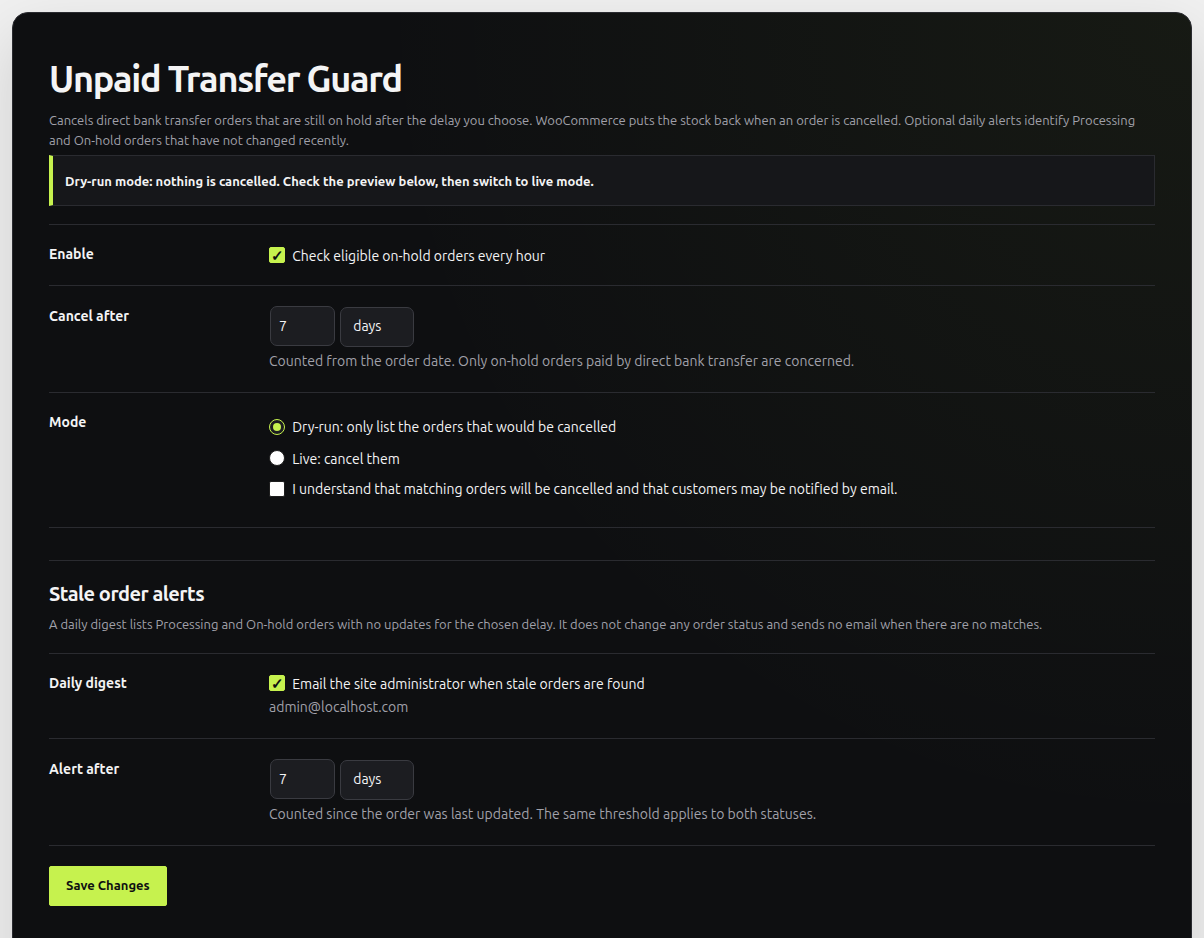
- Pick a delay — for example 7 days, or 48 hours.
- Dry-run first — right after activation, the plugin only lists the orders it would cancel. Nothing is changed until you switch to live mode and tick a confirmation box.
- Automatic, every hour — in live mode, expired orders are cancelled through the WooCommerce API, with an order note explaining why.
- Stock goes back automatically — WooCommerce restores the stock of a cancelled order itself; the plugin never touches stock levels.
- Last-second checks — each order is checked again right before being cancelled, so an order paid in the meantime is left alone.
- Clear logs — every run is written to WooCommerce Status Logs.
- Stale order alerts — optionally send the site administrator a daily digest when Processing or On-hold orders have had no updates for a delay you choose. No email is sent when there are no matching orders, and alerts never change order statuses.
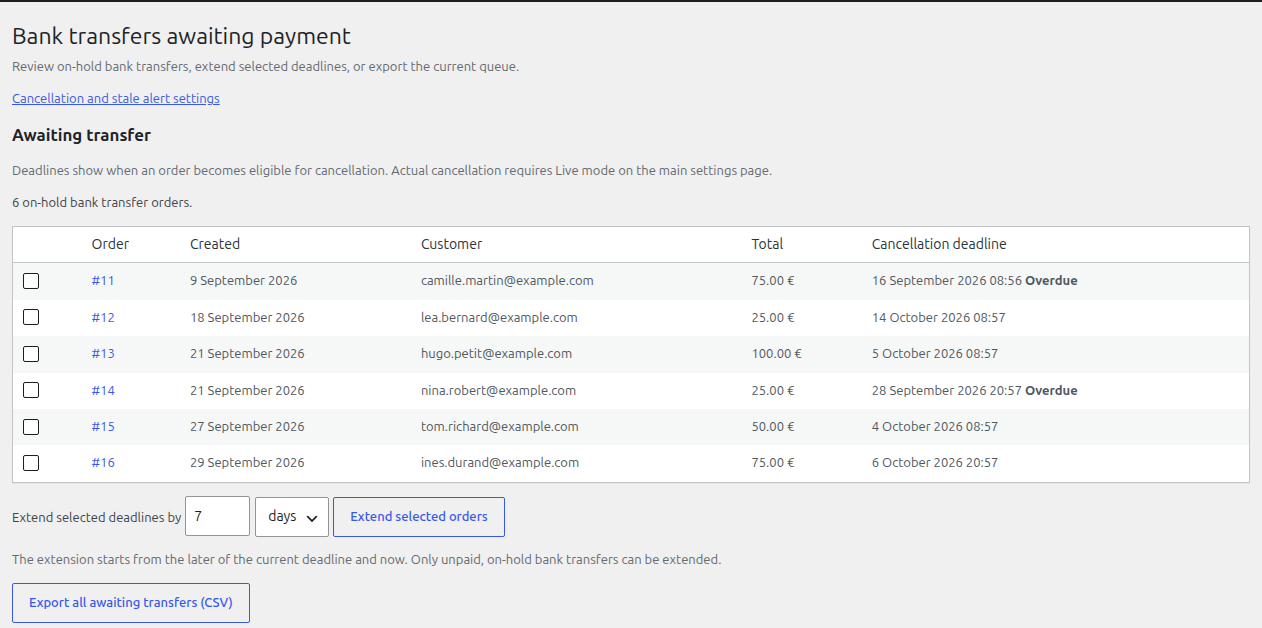
- Collection dashboard — see on-hold bank transfers, their current cancellation deadlines and any overdue orders.
- Bulk extensions and CSV — extend selected unpaid bank transfer deadlines without changing order statuses, and export the waiting-transfer queue.
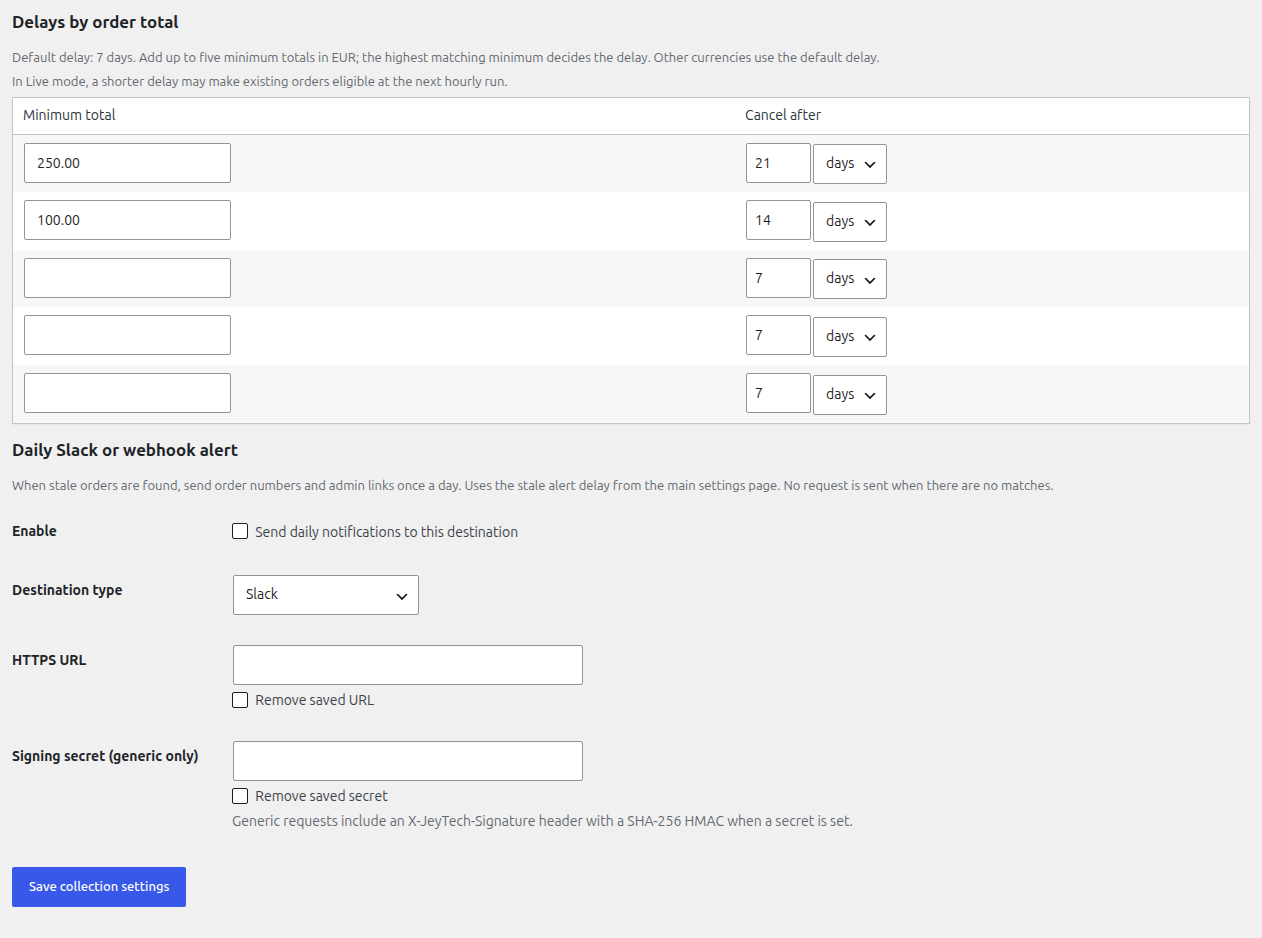
- Rules by order total — set up to five minimum-total thresholds with their own cancellation delays. The highest matching threshold applies; otherwise the global delay applies.
- Optional Slack or webhook alerts — send the daily stale-order summary to a configured HTTPS destination only after explicitly enabling it.
Automatic cancellation, total-based deadlines and manual extensions concern only unpaid, on-hold Direct bank transfer orders. Cheque, cash on delivery and card orders are never cancelled by this plugin. Stale-order alerts can report Processing and On-hold orders regardless of payment method.
Compatible with High-Performance Order Storage (HPOS) and the Cart & Checkout blocks.
Скриншоттор
Орнотуу
- Install and activate the plugin (WooCommerce must be active).
- Go to WooCommerce Unpaid orders.
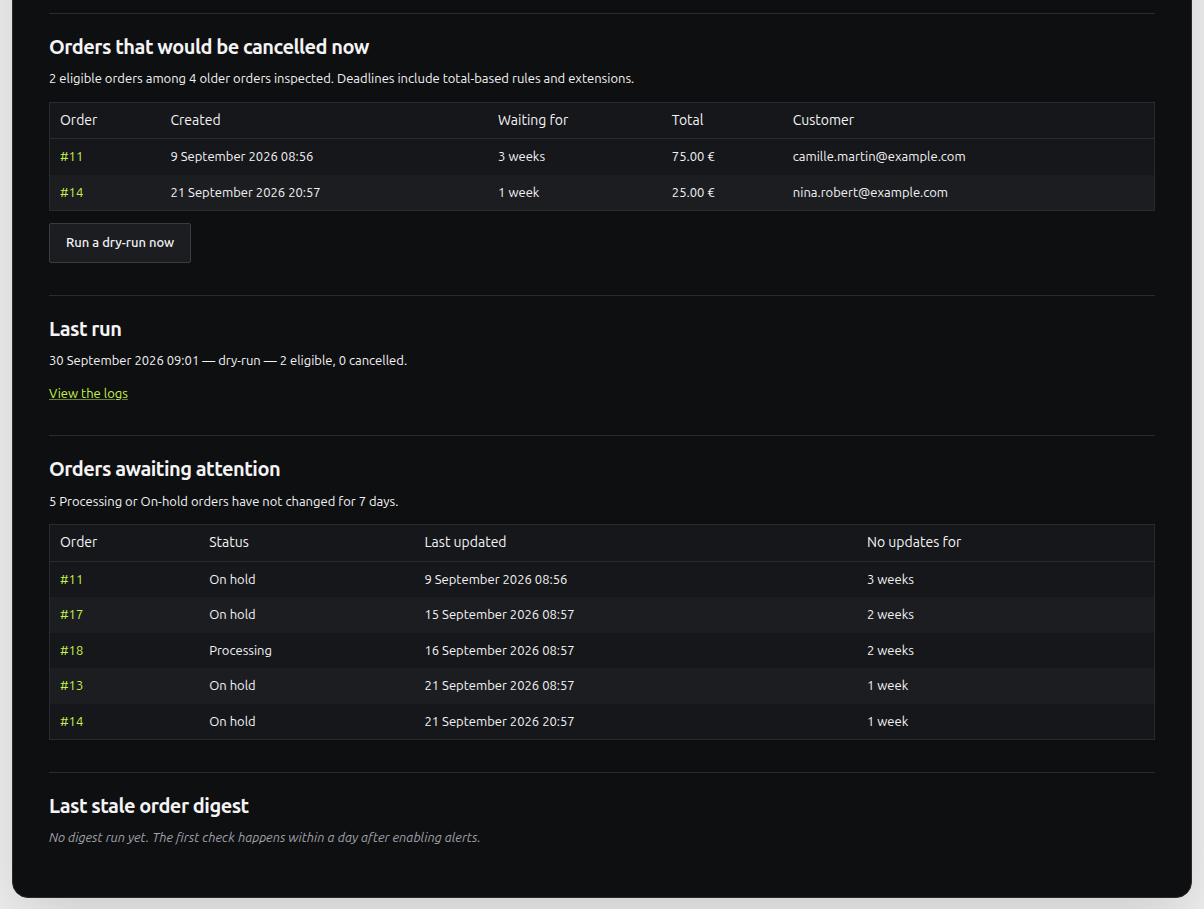
- Choose the delay, check the preview of the orders that would be cancelled.
- When the preview looks right, select Live, tick the confirmation box and save.
- Optionally enable Stale order alerts and choose how long an order may go without updates before it appears in the daily digest. This does not require Live mode.
- Open WooCommerce Bank transfers to review the queue, extend selected deadlines, export CSV, set total-based delays or opt in to Slack/webhook alerts.
FAQ.KG
-
Will it cancel orders as soon as I activate it?
-
No. The plugin starts in dry-run mode: it only lists the orders that would be cancelled. Real cancellations start only after you select live mode and tick the confirmation box.
-
What happens to the stock?
-
WooCommerce puts the stock back when an order is cancelled, exactly as when you cancel it by hand. The plugin does not change stock levels itself, so stock is never restored twice.
-
Are customers notified?
-
Cancelling an order triggers WooCommerce’s own emails, as when you cancel it by hand: the “Cancelled order” email to the store admin and, if enabled in WooCommerce Settings Emails, the “Cancelled order” email to the customer. Check these settings before switching to live mode.
-
What if the transfer arrives just before the delay ends?
-
Mark the order as paid (Processing) as usual: the plugin only cancels orders that are still on hold. Each order is checked again right before being cancelled.
-
Does it work with HPOS and the Checkout block?
-
Yes. The plugin only uses the WooCommerce order API, and declares compatibility with High-Performance Order Storage and the Cart & Checkout blocks.
-
Can it handle cheque payments too?
-
Not in this version: only Direct bank transfer (BACS) orders are handled.
-
How often does it run?
-
Every hour, in batches of 50 orders. If more orders are waiting, the next batch starts right away. You can also run it manually from the settings page.
-
How do stale order alerts work?
-
When enabled, the plugin checks Processing and On-hold orders once a day. If an order has not been updated for longer than the separate alert delay, a plain-text digest goes to the site’s administrator email address. The preview on the settings page shows matching orders. The first scheduled check happens within a day of enabling alerts. No digest is sent when none match. The alert never changes an order’s status or stock.
-
How are total-based rules and extensions applied?
-
For bank transfer orders in the store currency, the highest minimum-total rule that the order reaches decides its base delay. Other currencies use the global delay. A manual extension moves the deadline forward from the later of its current deadline and the present time. Only still-unpaid, on-hold bank transfers can be extended. Existing extensions are never shortened by a later settings change.
The dashboard shows projected deadlines even in dry-run mode. Actual cancellation still requires Live mode. If Live mode is already active, setting a shorter delay can make existing orders eligible at the next hourly run.
-
What does the CSV contain?
-
The export streams the current on-hold bank transfer queue to the authorized shop manager’s browser. It contains order numbers, creation dates, customer email addresses, totals, currencies and deadlines. No export file is kept on the server.
-
Does this plugin contact an external service?
-
Only if the shop manager explicitly enables a Slack or generic HTTPS webhook in WooCommerce Bank transfers. When stale Processing or On-hold orders exist, the plugin sends a daily JSON request with the site name or URL, number of matching orders, and up to 50 order numbers and administrator edit links. It sends no customer names or email addresses. No request is made when no order matches. A generic webhook can include an HMAC-SHA256 signature if a secret is configured. The merchant controls the destination and should review its privacy and retention policy. For Slack, see Slack’s service terms and privacy policy. The plugin does not send data to JeyTech.
Сын-пикирлер
There are no reviews for this plugin.
Contributors & Developers
“JeyTech Unpaid Transfer Guard for WooCommerce” is open source software. The following people have contributed to this plugin.
Мүчөлөрү
Translate “JeyTech Unpaid Transfer Guard for WooCommerce” into your language.
Interested in development?
Browse the code, check out the SVN repository, or subscribe to the development log by RSS.
Өзгөртүүлөр
3.0.0
- Bank transfer collections dashboard, bulk deadline extensions, CSV export and total-based cancellation delays.
- Explicitly enabled Slack or signed generic webhook for daily stale-order alerts.
2.0.0
- Optional daily digest of stale Processing and On-hold orders, with an independent delay and a read-only preview.
1.1.0
- Add extension hooks for optional payment methods, per-gateway delays, exclusions and reminders.
- Refresh the WooCommerce settings screen with the JeyTech design and updated screenshots.
1.0.0
- First release: delay in days or hours, dry-run preview, hourly cancellation of expired on-hold bank transfer orders, order notes, logs.