

Сүрөттөө
Make it easy for your readers and users to copy code snippets directly from your website. The Code Block Copy Button plugin adds a handy copy button to all code blocks, helping developers, tech writers, and educators improve user experience.
Features:
– Automatically adds a Copy button to all <pre> code blocks, including Gutenberg Code and Preformatted blocks.
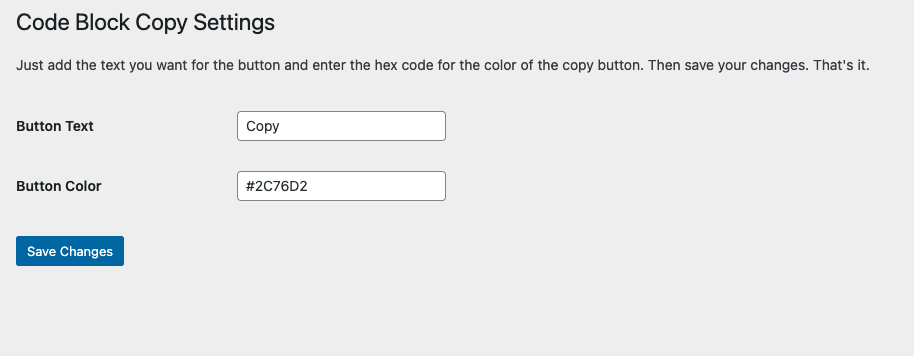
– Customize the button text (e.g., “Copy”, “Copy Code”).
– Change the button color to match your site’s theme.
– Clean, modern SVG icon included in the button.
– Simple settings panel under Settings > Code Block Copy.
– Works with both Classic and Gutenberg editors.
– Includes an optional promotional banner in the admin panel.
License
This plugin is licensed under the GPL2 license. See https://www.gnu.org/licenses/gpl-2.0.html for details.
Скриншоттор

Орнотуу
- Upload the plugin files to the
/wp-content/plugins/code-block-copy-buttondirectory, or install it directly through the WordPress plugins screen. - Activate the plugin through the ‘Plugins’ screen in WordPress.
- Navigate to Settings > Code Block Copy to configure the button text and color.
FAQ.KG
-
How do I use this plugin?
-
Simply install and activate it. The Copy button will appear automatically on all
<pre>code blocks. Use the settings page to customize the button text and color. -
At this time, the button is placed at the top-right of each code block. Future updates may include position customization.
-
Does this plugin support Gutenberg blocks?
-
Yes! It works with the Gutenberg Code block, Preformatted block, and any manually added
<pre>tags.
Сын-пикирлер
There are no reviews for this plugin.
Contributors & Developers
“Code Block Copy Button” is open source software. The following people have contributed to this plugin.
Мүчөлөрү
“Code Block Copy Button” has been translated into 2 locales. Thank you to the translators for their contributions.
Translate “Code Block Copy Button” into your language.
Interested in development?
Browse the code, check out the SVN repository, or subscribe to the development log by RSS.
Өзгөртүүлөр
1.5.5
- Corrected readme metadata (Tested up to, upgrade notices) and refreshed asset cache-busting versions.
1.5.4
- Updated button functions and plugin description.
1.5.3
- Changed admin settings ad link to point to CopyMyIP.dev
1.4
- New admin settings, SVG icon added, duplicate button fix, and improved copy functionality.
1.3
- Finalized admin settings with instructions and promotional banner.
- Cleaned up SVG icon for modern display.
- Prepared for WordPress repository submission.
1.2
- Added admin settings page.
- Included options for button text and color customization.
1.1
- Added Settings link directly from the Plugins page.
1.0
- Initial release. Copy button automatically added to code blocks.