

Сүрөттөө
DuetG AI Connector allows WordPress AI Client to connect to any AI service that provides an OpenAI-compatible API, such as:
- Ollama (local AI)
- LM Studio (local AI)
- MiniMax
- Moonshot
- DeepSeek
- SiliconFlow
- And any other OpenAI-compatible API provider
WordPress AI Integration
When installed together with the official WordPress AI plugin, you can use your custom API provider with WordPress’s built-in AI features:
- Alt Text Generation – Generates descriptive alt text for images using AI vision models (requires VLM model)
- Content Classification – AI-powered suggestions for post tags and categories based on content analysis
- Content Summarization – Summarizes long-form content into digestible overviews
- Excerpt Generation – Generates excerpt suggestions from content
- Image Generation – Generate featured images and inline images using AI
- Image Prompt Generation – Generates a prompt from post content that can be used to generate an image
- Meta Description Generation – Generates meta description suggestions and integrates with various SEO plugins
- Review Notes – Reviews post content block-by-block and adds Notes with suggestions for Accessibility, Readability, Grammar, and SEO
- Title Generation – Generates title suggestions from content
Model Capabilities
All Models (text generation endpoint):
* Content Classification
* Content Summarization
* Excerpt Generation
* Image Prompt Generation
* Meta Description Generation
* Review Notes
* Title Generation
Vision-Language Models (VLM) additionally support:
* Alt Text Generation (analyzes image content)
Image Generation Endpoint:
* Image Generation (featured images and inline images)
Note: Only Alt Text Generation requires a VLM. All other features work with a standard text-only model.
Requirements
- PHP 7.4 or higher
- WordPress 7.0 or higher (uses built-in Connectors API)
- (Optional) WordPress AI plugin for enhanced integration
External Services
This plugin connects to user-configured, third-party AI API services
(any OpenAI-compatible API endpoint). It is needed to provide AI text
generation and image generation features.
Data is sent to the configured API endpoint when:
* A user submits a text generation request via the Test AI page or
the WordPress AI features (Alt Text, Summarization, Review Notes, etc.)
* A user submits an image generation request
The data sent includes: the user’s prompt text, model configuration,
and for vision features, image data.
Since this plugin connects to user-configured endpoints, users should
review the terms of service and privacy policy of their chosen provider:
* OpenAI: Terms of Service,
Privacy Policy
* Other providers: Please consult your provider’s documentation
Скриншоттор
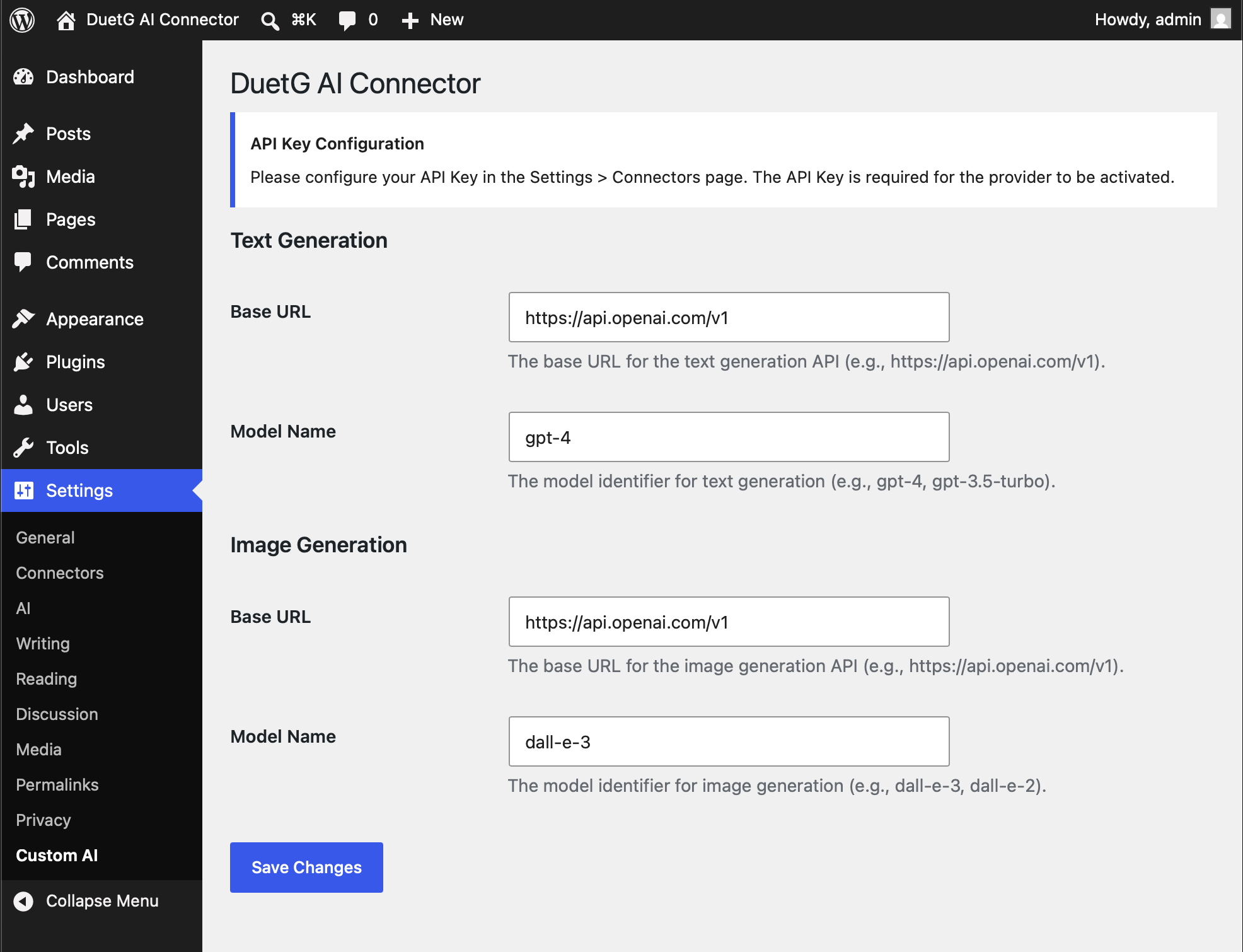
Custom AI settings screen – Configure Base URL and model for text and image generation. 
Connectors screen – Manage API keys for your AI provider. 
Test AI screen – Verify your AI configuration and test text/image generation.
Орнотуу
- Upload the
duetg-ai-connectorfolder to the/wp-content/plugins/directory - Activate the plugin through the ‘Plugins’ menu in WordPress
- Configure your API key at Settings > Connectors
- Go to Settings > Custom AI to configure your Base URL and model
- (Optional) Go to Tools > Test AI to verify your configuration
FAQ.KG
-
How do I enable debug logging?
-
To enable debug logging, add the following to your
wp-config.php:define('DUETGAICON_DEBUG', true);When enabled, debug information will be written to your server’s debug log (usually
wp-content/debug.log). This includes:
* Request/response details for AI API calls
* Provider registration status
* Model handler informationNote: Disable debug logging in production environments to avoid performance impact and log file growth.
-
Does this plugin work without WordPress 7.0?
-
No, this plugin requires WordPress 7.0 or higher because it uses the built-in Connectors API for API key management.
-
Why do the number of suggestions and notes sometimes not match?
-
When using Review Notes, you may notice that the number of suggestions returned by the AI does not exactly match the number of notes displayed in the editor.
This is expected behavior and has two causes:
-
Multi-category suggestions: Some AI models return a single suggestion that applies to multiple review categories (e.g.,
review_type: "seo, accessibility"). The plugin preserves these as-is, so one suggestion may appear under multiple note categories in WordPress AI Client. -
Model response format: The AI model controls the number of suggestions it returns, and WordPress AI Client determines how to display and categorize them. The plugin correctly forwards the model’s response without modifying the count.
If you need more consistent results, consider using a model that reliably returns structured JSON with distinct suggestions per category.
-
-
How do I find the Base URL for my AI provider?
-
- Ollama (local):
http://localhost:11434/v1 - LM Studio (local):
http://localhost:1234/v1 - MiniMax:
https://api.minimax.io/v1 - Moonshot:
https://api.moonshot.ai/v1 - DeepSeek:
https://api.deepseek.com/v1 - SiliconFlow:
https://api.siliconflow.cn/v1 - Other providers: Check their documentation
- Ollama (local):
-
Do I need an API key?
-
Some providers require an API key. For local installations (like Ollama) that don’t require authentication, you can enter any dummy string (e.g., “not-required”) as the API key.
-
Why do local reasoning/thinking models sometimes timeout?
-
Local reasoning models (like Gemma 4, QwQ, etc.) running on Ollama generate long “thinking” chains before producing their final answer. This process can take 30-60 seconds or more, which can trigger cURL’s low speed limit timeout (30 seconds by default).
Cloud models generally work well – most cloud API providers (DeepSeek, MiniMax, Moonshot, etc.) respond quickly without timeout issues. If a cloud model frequently times out, it may have unusually long thinking chains – try switching to a different model.
Recommended solutions for local models:
-
Use non-reasoning models for local AI features. For Ollama, models like
qwen2.5:7b,llama3.2:3b, orphi3work well without the timeout issue. -
Configure Ollama to keep models loaded:
bash

export OLLAMA_KEEP_ALIVE=-1  # Keep model in memory
If using reasoning models, be aware that WordPress AI features may be slower or timeout. The thinking behavior is controlled by the model, not by the plugin.
-
-
How do I use a local AI provider (like Ollama or LM Studio)?
-
By default, WordPress blocks requests to localhost and private IP addresses for security (SSRF protection). If you’re using a local AI provider, you can disable this protection by adding to your
wp-config.php:define('DUETGAICON_ALLOW_LOCAL_URLS', true);Warning: Disabling SSRF protection allows requests to private/local IPs. Only enable this if you trust your local AI provider and your server is not directly accessible from the internet.
This setting applies to both text and image models when using local AI providers.
Tip: When
DUETGAICON_ALLOW_LOCAL_URLSis enabled, a Network Connectivity Test tool appears on the Test AI page (Tools > Test AI). You can use it to verify that your WordPress server can reach your local AI provider before running actual AI feature tests. This is especially useful for debugging connection issues with local Ollama or LM Studio installations. -
How do I use this in my code?
-
use WordPress\AiClient\AiClient;
$registry = AiClient::defaultRegistry();

// Text Generation
$model = $registry->getProviderModel('custom_text', 'gpt-4');
$result = $model->generateTextResult([
    new \WordPress\AiClient\Messages\DTO\UserMessage([
        new \WordPress\AiClient\Messages\DTO\MessagePart('Your prompt here')
    ])
]);
echo $result->toText();

// Image Generation
$model = $registry->getProviderModel('custom_image', 'dall-e-3');
$result = $model->generateImageResult([
    new \WordPress\AiClient\Messages\DTO\UserMessage([
        new \WordPress\AiClient\Messages\DTO\MessagePart('Your prompt here')
    ])
]);
$files = $result->toImageFiles();
Сын-пикирлер
There are no reviews for this plugin.
Contributors & Developers
“DuetG AI Connector” is open source software. The following people have contributed to this plugin.
Мүчөлөрү
“DuetG AI Connector” has been translated into 1 locale. Thank you to the translators for their contributions.
Translate “DuetG AI Connector” into your language.
Interested in development?
Browse the code, check out the SVN repository, or subscribe to the development log by RSS.
Өзгөртүүлөр
0.3.1
- Added isLocalUrl() helper method for detecting localhost/private IP URLs
- Added explicit error message when local AI URL is configured but DUETGAICON_ALLOW_LOCAL_URLS is disabled
- Fixed PHP syntax error (stray ); in TestPage.php)
- Fixed PHPCS: use wp_kses_post for error output to allow HTML formatting
- Fixed PHPCS: use sprintf with translators comment for i18n-friendly error messages
- Network Connectivity Test button now uses primary styling
- Refactored duplicate local URL detection code into Helper::isLocalUrl()
0.3.0
- Renamed plugin to DuetG AI Connector (from Custom AI Provider)
- Added Content Classification feature (AI-powered suggestions for post tags and categories)
- Added Meta Description Generation feature
- Added WordPress Connector Registry integration for WordPress 7.0+ compatibility
- Added multi-provider response format normalization for MiniMax, Kimi, GLM, and Tencent Hunyuan
- Added automatic JSON keyword injection for DashScope (qwen/glm) models
- Improved JSON extraction using balanced brace counting instead of non-greedy regex
- Added detailed debug logging with URL sanitization
- Added Network Connectivity Test feature to Test AI page for debugging local Ollama connections
- Expanded DUETGAICON_ALLOW_LOCAL_URLS to apply to entire plugin (text and image models)
- Added FAQ section explaining local reasoning model timeout issues
- Removed WordPress AI version requirements from documentation
- Cleaned up debug logging code in CustomTextGenerationModel
- Fixed PHPCS: sanitize test_url before use in form field
- Network Connectivity Test now hidden when DUETGAICON_ALLOW_LOCAL_URLS is disabled
- Fixed Network Connectivity Test button styling (now uses primary style)
- Added Network Connectivity Test documentation to local AI provider FAQ
0.2.3
- Fixed OutputNotEscaped error for image URL in TestPage.php
0.2.2
- Fixed namespace declaration order in Settings.php (moved before ABSPATH check)
- Fixed JS file version to use JS file’s own mtime instead of plugin.php
- Added function_exists() wrapper to custom_ai_debug() to prevent conflicts
- Fixed duplicate docblock comment in ThinkingTagHelper
- Fixed typo in CustomImageGenerationModel comment (“if not setting” “if not set”)
- Added URL sanitization in debug logs to filter sensitive params
- Changed JSON regex from greedy to non-greedy matching for better accuracy
- Fixed dirname level bug in TestPage.php (dirname level 3 2)
- Fixed array_map key preservation bug in debug logging
- Inlined URL sanitization logic to avoid nested function definition
0.2.1
- Fixed missing resource version in wp_enqueue_script()
- Fixed unsescaped output in test page
- Added direct file access protection to Settings.php
- Added SSRF protection for image URLs (blocks localhost/private IPs by default)
- Added DUETGAICON_ALLOW_LOCAL_URLS constant to enable local image URLs when needed
- Updated to WordPress AI plugin (removed “Experiments” branding)
0.2.0
- Added compatibility with WordPress AI plugin (0.6.0+)
- Added Alt Text Generation support (requires VLM model)
- Added Image Prompt Generation support
- Added Review Notes feature
- Added Title Generation support
- Added Content Summarization support
- Added Excerpt Generation support
- Added thinking/reasoning support for models like DeepSeek, Qwen, MiniMax, Kimi
- Improved JSON response parsing for better compatibility
- Added debug logging (controlled via WP_DEBUG)
0.1.0
- Initial release
- Support for text generation
- Support for image generation