

Сүрөттөө
Fuxux Social Poster connects your WordPress site to Fuxux, the AI-powered social media scheduler. When you publish a post, this plugin automatically sends it to the social accounts you’ve connected in Fuxux — no copy-pasting captions, no logging into five different apps.
Features
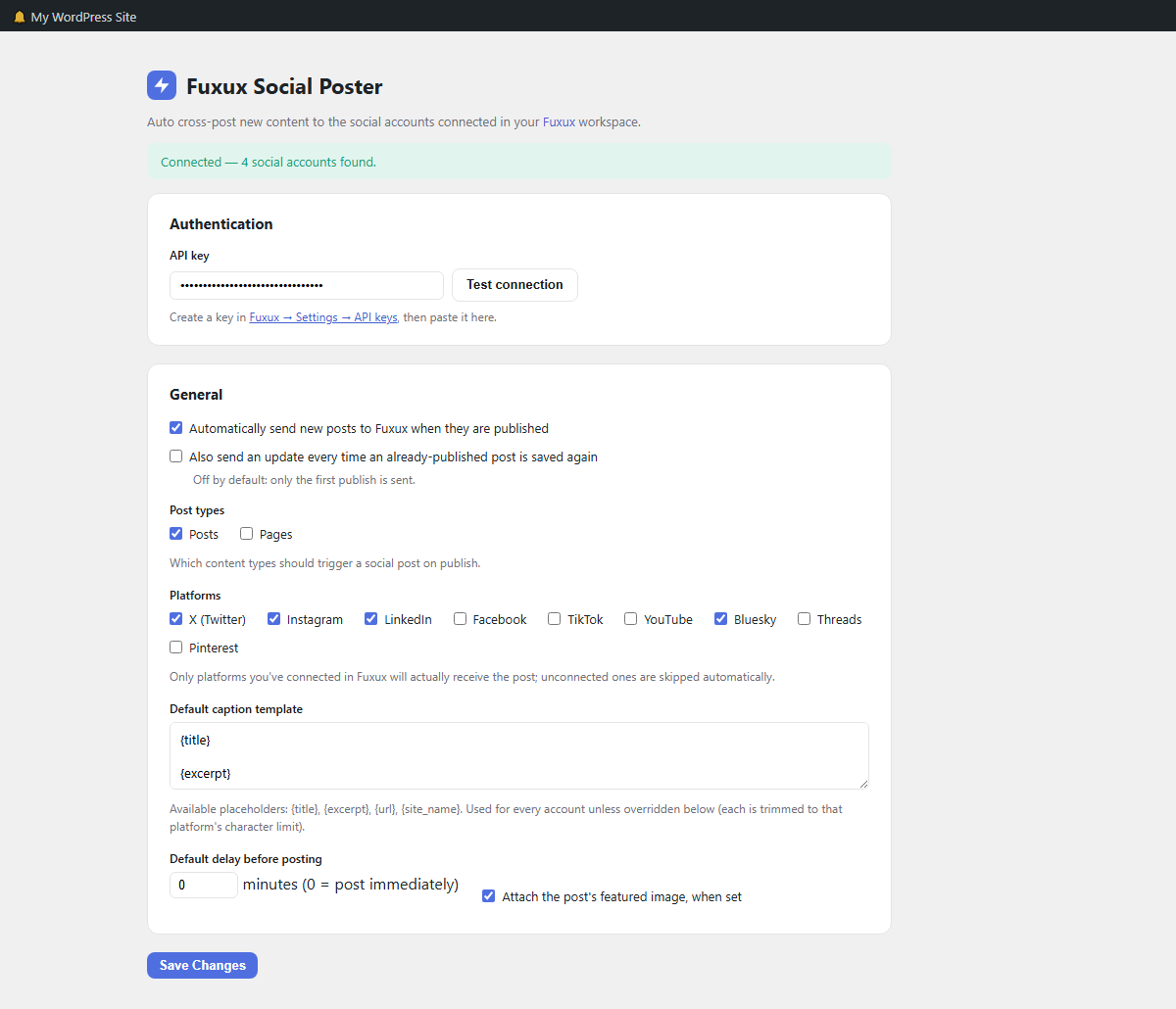
- One-time setup: paste your Fuxux API key and pick your platforms.
- Posts to X (Twitter), Instagram, LinkedIn, Facebook, TikTok, YouTube, Pinterest, Bluesky, Threads, and Discord. Google Business Profile is coming soon.
- Auto-posts (or schedules with a delay) whenever a post is published — optionally also on every later update.
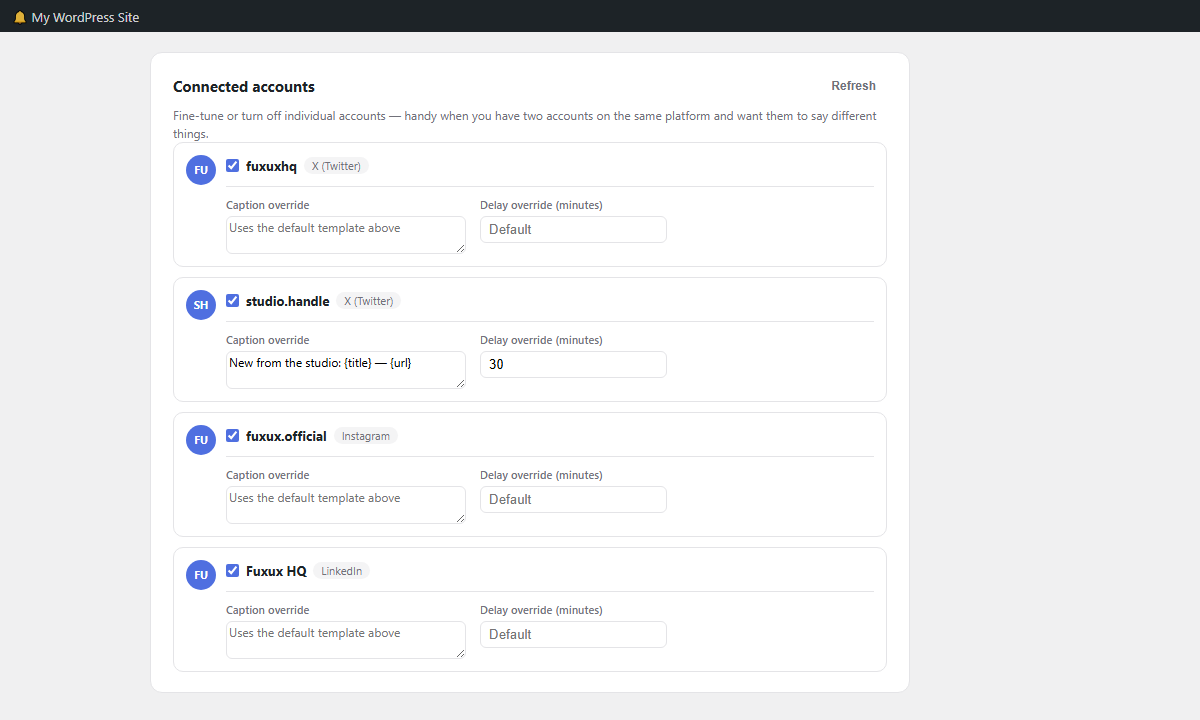
- Per-account fine-tuning: turn individual connected accounts off, or give them their own caption template and delay, right down to two accounts on the same platform saying different things.
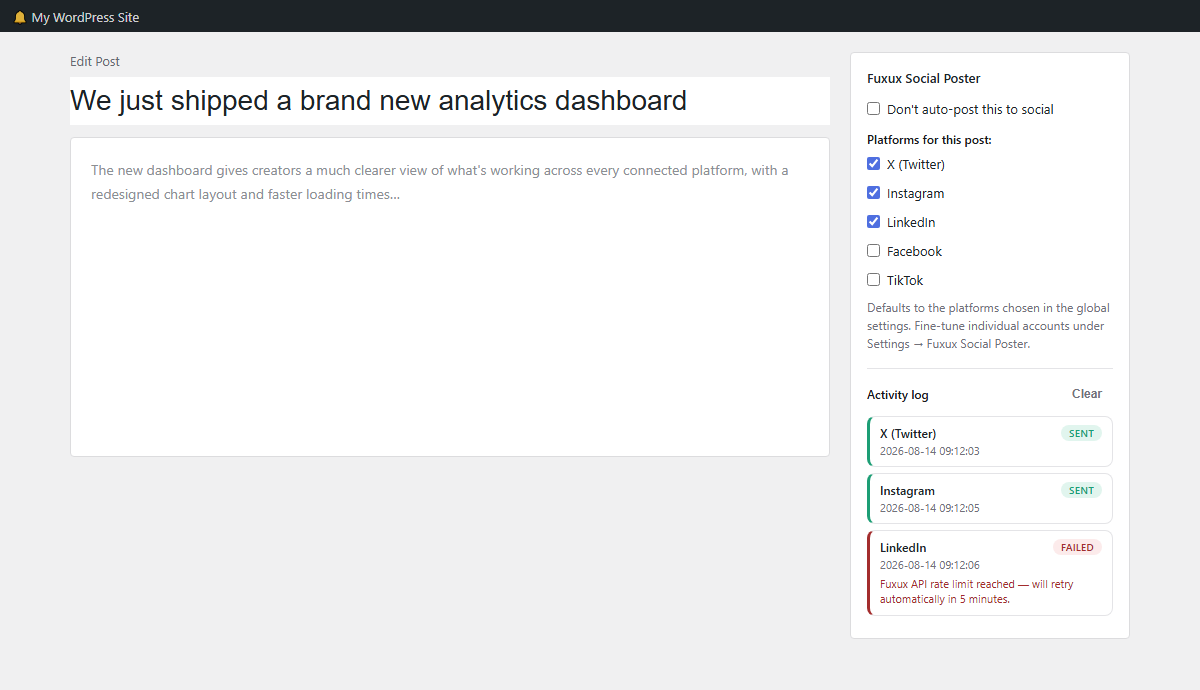
- Per-post override: skip auto-posting or choose different platforms from a checkbox on the post editor.
- Customizable caption template with
{title},{excerpt},{url}and{site_name}placeholders. - Automatically trims captions to fit each platform’s character limit.
- Attaches the post’s featured image when available.
- Per-post activity log — see exactly what was sent to which account and whether it succeeded.
- “Test connection” button confirms your API key and lists the social accounts Fuxux sees.
- Sending happens in the background (WP-Cron), so publishing a post never waits on Fuxux or any social network to respond.
Requirements
- A paid Fuxux plan with the API add-on ($5/month), and at least one connected social account.
- An API key, created on the API keys page of your Fuxux dashboard. Use a key just for this site: rotating a key revokes the old one.
This plugin does not store your social media passwords — all publishing happens through Fuxux’s own connected accounts and OAuth tokens. WordPress only needs a Fuxux API key.
External Services
This plugin connects to the Fuxux API (fuxux.com) using a personal API key you provide, to:
- Fetch the list of social media accounts connected to your Fuxux workspace, so you can choose which ones to post to.
- Send the title, excerpt/content-derived caption text, permalink, site name, and (optionally) the featured image URL of a post you publish or update, so Fuxux can post it to your chosen social accounts.
This only happens when you explicitly enable auto-posting, and only for the post types you select. You can revoke access at any time by deleting the API key from the plugin’s settings screen or from your Fuxux account.
See Fuxux’s Terms of Service and Privacy Policy for more information on how your data is handled once it reaches Fuxux.
Скриншоттор
Орнотуу
- Upload the
fuxux-social-posterfolder to/wp-content/plugins/, or install it from the WordPress plugin directory. - Activate the plugin through the Plugins screen.
- Go to Settings Fuxux Social Poster.
- Paste the API key from your Fuxux account (Settings API keys) and click Test connection.
- Choose which post types and platforms should auto-post, then save.
FAQ.KG
-
Do I need a Fuxux account?
-
Yes. Fuxux Social Poster only relays your WordPress content — the actual posting to Instagram, TikTok, X, etc. is handled by your Fuxux account’s connected social integrations. The plugin publishes through the Fuxux API, which needs a paid plan with the API add-on; sign up at fuxux.com.
-
Can I control which posts go out?
-
Yes. Each post editor has a “Fuxux Social Poster” panel where you can skip auto-posting entirely or choose a different set of platforms for that specific post.
-
Does it post immediately?
-
By default, yes, right when the post is published. You can set a delay (in minutes) under Settings Fuxux Social Poster if you’d rather schedule it a bit later.
-
What happens if a platform isn’t connected in Fuxux?
-
Fuxux automatically skips platforms that don’t have a connected account, so nothing fails — it just posts to whatever is connected.
-
Sending happens via WP-Cron a few seconds after you publish, not during the publish request itself, so the editor never waits on Fuxux or a social network to respond. WP-Cron only runs on site traffic, so on a very low-traffic site it can take a little longer to fire — a real cron job hitting
wp-cron.phpon a schedule (common on most hosts) avoids that.
Сын-пикирлер
There are no reviews for this plugin.
Contributors & Developers
“Fuxux Social Poster” is open source software. The following people have contributed to this plugin.
Мүчөлөрү
Translate “Fuxux Social Poster” into your language.
Interested in development?
Browse the code, check out the SVN repository, or subscribe to the development log by RSS.
Өзгөртүүлөр
1.2.1
- Google Business Profile is now marked “Soon” and can’t be ticked: Fuxux can’t publish to it yet. Nothing was being sent to it before, so no site loses a working destination. It will be switched back on in a later update.
1.2.0
- Added Google Business Profile and Discord to the supported platforms. Both are off until you tick them in Settings, so existing sites keep posting exactly where they did.
1.1.1
- Fixed: an invalid API base URL (e.g. a typo, or a scheme other than http/https) is now rejected with a warning and falls back to the default, instead of being saved as-is and silently breaking every future publish attempt.
1.1.0
- Added per-account overrides: enable/disable, custom caption, custom delay per connected account (Settings Connected accounts).
- Added an optional “also send on update” trigger, not just first publish.
- Added a per-post activity log (post editor sidebar) with a Clear button.
- Added Pinterest to the supported platform list.
- Sending now happens via WP-Cron in the background instead of during the publish/update request itself.
- Automatically retries on a rate limit or a transient network/server error (up to 3 attempts, a few minutes apart) — never on a permanent failure like a bad API key, and never resends anything that already succeeded.
- Restyled the settings screen and post-editor panel to match the Fuxux brand.
1.0.0
- Initial release: auto cross-posting, per-post overrides, caption templating, connection test.