

Сүрөттөө
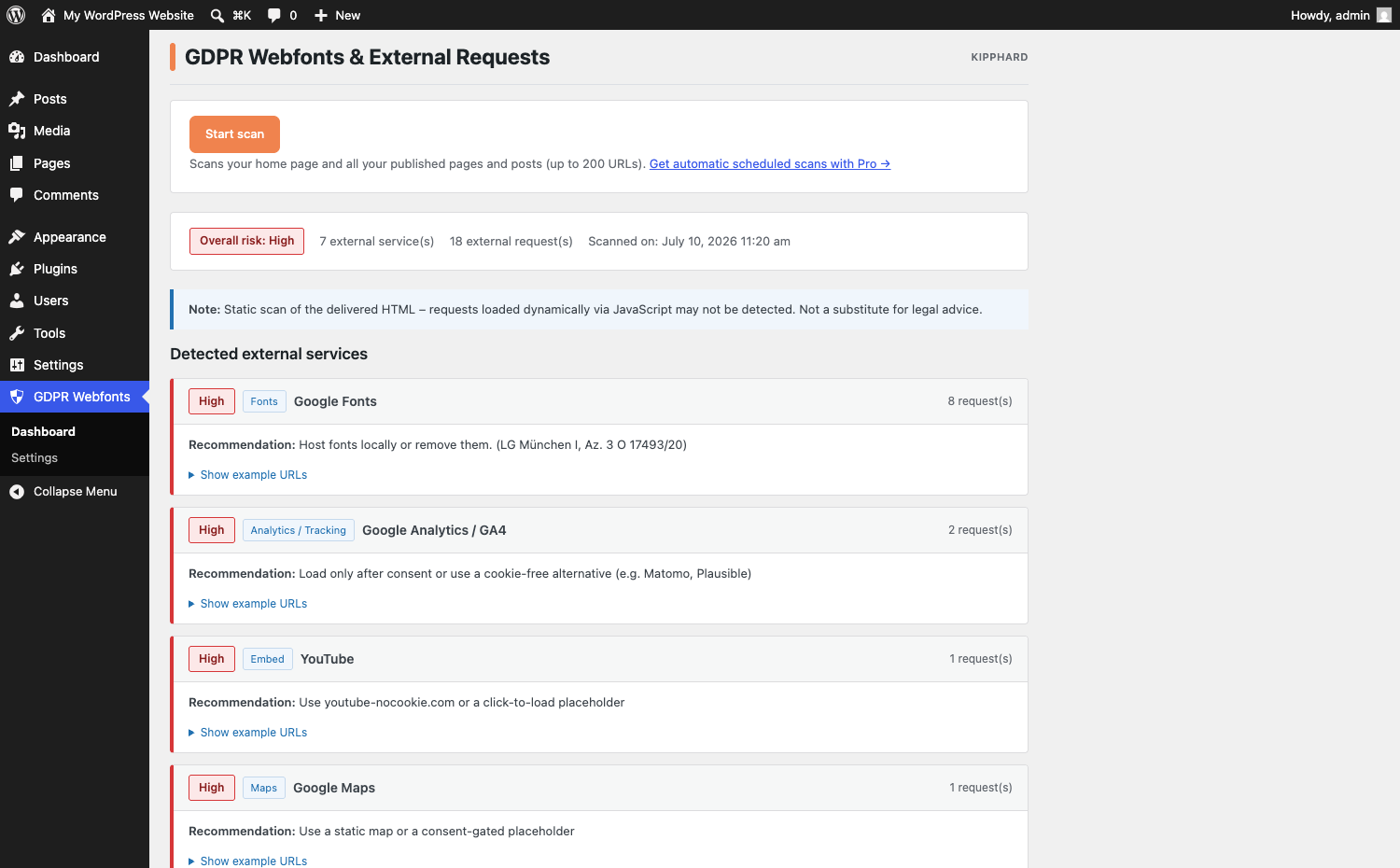
Kipphard GDPR Web Fonts is an honest audit tool for WordPress sites. It fetches the HTML your site actually delivers and detects external requests that transmit personal data — such as IP addresses — to third-party servers, including Google Fonts, Google Analytics, YouTube embeds, Google Maps, Gravatar, reCAPTCHA, Facebook Pixel, Hotjar, and common JavaScript CDNs.
The plugin groups findings by risk level with clear, actionable recommendations. Several common issues can be fixed directly through the plugin settings without touching code.
What this plugin does:
- Scans your whole site: the homepage plus all published pages and posts (capped at 200 URLs per run purely as a performance safeguard)
- Detects 14 categories of known external services: fonts, analytics/tracking, video embeds, maps, avatars, CAPTCHAs, social-media pixels, CDN scripts, and more
- Classifies every finding by risk level (High / Medium / Low) with a concrete recommendation
- Shows example URLs for each detected external request
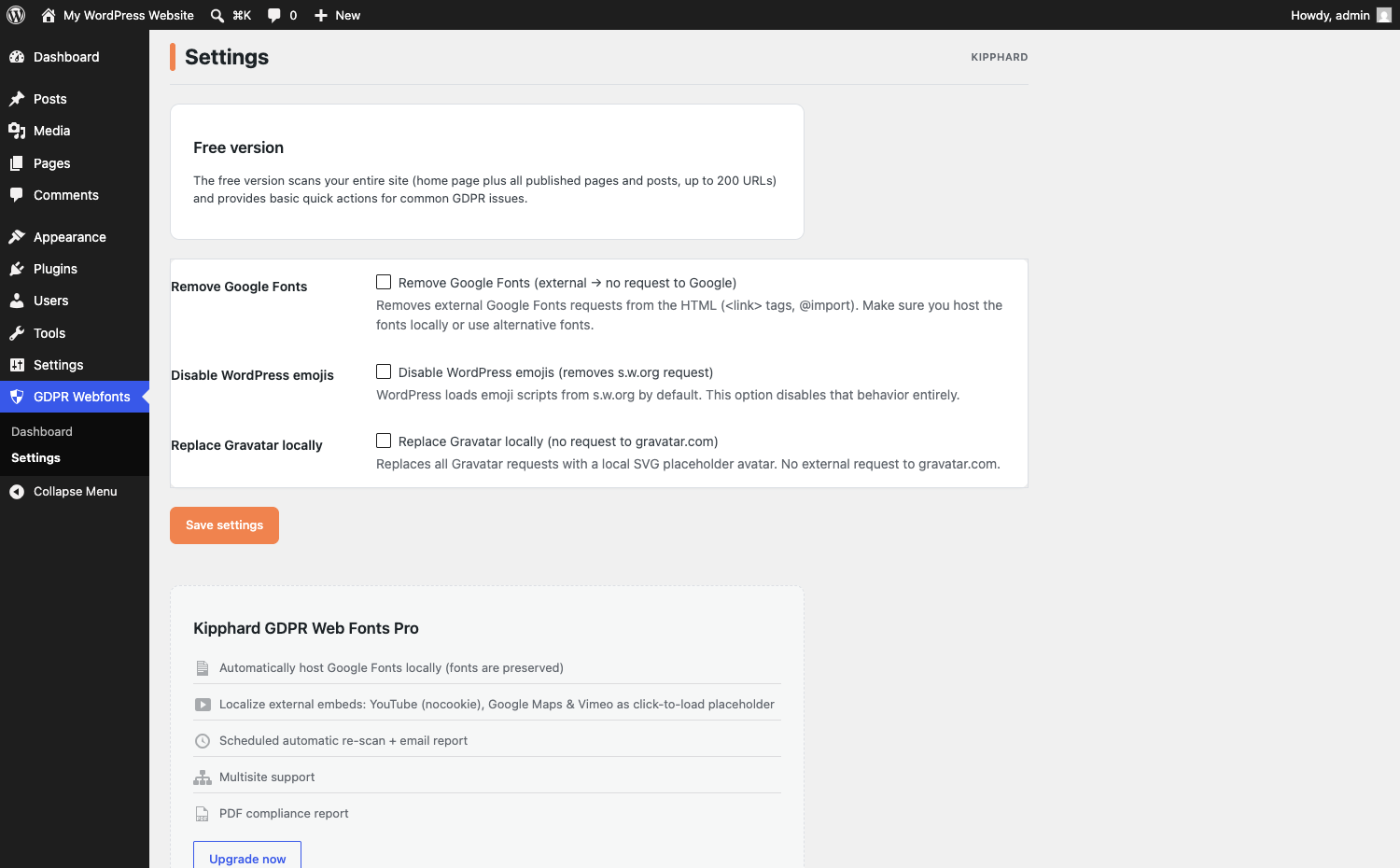
- Free quick fixes: remove Google Fonts (strips external
<link>tags and@importrules — see the FAQ for the WordPress 6.9 requirement), disable WordPress emoji scripts (removes thes.w.orgrequest), replace Gravatar with a local SVG placeholder - No tracking, no external requests from the plugin itself — everything runs locally on your server
What this plugin does NOT do:
This plugin is not a cookie-banner overlay and does not claim automatic GDPR compliance. The scan is static: requests triggered dynamically by JavaScript after page load may not appear in the delivered HTML and will therefore not be detected. A complete privacy audit additionally requires browser developer tools or a specialised service.
This plugin does not replace legal advice. Use it to identify and reduce external requests; have a lawyer or data-protection officer review your specific situation.
About the Google Fonts ruling: On 20 January 2022 the Munich Regional Court I (LG München I, Az. 3 O 17493/20) ruled that embedding Google Fonts without visitor consent violates the GDPR because the visitor’s IP address is transmitted to Google servers in the USA. This plugin helps you detect and remove such requests.
Hinweis (DE): Dieses Plugin ist ein ehrliches Datenschutz-Analyse-Werkzeug für WordPress-Seiten. Es scannt das gerenderte HTML auf externe Anfragen (Google Fonts, Analytics, YouTube, Gravatar u. v. m.), die personenbezogene Daten an Dritte übertragen, und bietet direkte Schnell-Maßnahmen. Die Benutzeroberfläche ist auf Deutsch verfügbar.
External services
This plugin does not connect to any third-party or external service, and it sends no data off your server.
To analyse your site it fetches your own published URLs over HTTP — restricted to your own host by an SSRF safeguard — and parses the returned HTML locally on your server. The service domains referenced in the plugin code (Google Fonts, Google Analytics, Facebook, jQuery/CDN hosts, Font Awesome, etc.) are detection signatures the scanner searches for inside your own HTML; the plugin never loads, embeds or contacts them.
Скриншоттор
Орнотуу
- Upload the
kipphard-gdpr-webfontsfolder to/wp-content/plugins/, or install it from the Plugins screen in your WordPress admin. - Activate the plugin through the “Plugins” menu in WordPress.
- Go to GDPR Webfonts Dashboard and click “Start scan”.
- Review the results, then go to GDPR Webfonts Settings to enable the desired quick fixes.
FAQ.KG
-
Does this plugin make my site automatically GDPR-compliant?
-
No. This is an audit tool, not a compliance overlay. It shows you which external requests your site makes and provides recommendations, but the actual work — hosting fonts locally, obtaining consent, replacing services — has to be done by you or your development team. When in doubt, consult a data-protection professional or lawyer.
-
How many pages are scanned?
-
All of them: the scan covers your homepage plus every published page and post. Very large sites are capped at 200 URLs per run — a performance safeguard, not a feature limit.
-
Is any data sent to external servers during a scan?
-
No. The plugin fetches your own URLs internally over HTTP and analyses the returned HTML locally. No data is transferred to any third party.
-
Why does the scan not detect all external requests?
-
The plugin analyses the HTML that your server delivers on initial load. Requests triggered later by JavaScript (for example on scroll or click) are not visible in the static HTML and are therefore not detected. For a complete picture, also check your browser’s Network tab.
-
Why does removing Google Fonts need WordPress 6.9?
-
Removing a font reference that a theme has hard-coded into its templates, or written as an
@importrule inside a<style>block, means rewriting the finished HTML page. WordPress 6.9 introduced a standard way for plugins to do that — the template enhancement output buffer — and this plugin uses it rather than opening an output buffer of its own, which is unreliable when several plugins do it at once.On WordPress 6.4 to 6.8 the quick fix still removes Google Fonts stylesheets that were enqueued through WordPress (the common case) and the
preconnect/dns-prefetchhints. Hard-coded<link>tags and@importrules are left in place; the scan report continues to list them so you can remove them from your theme by hand. -
Why is Google Fonts classified as “High risk”?
-
On 20 January 2022 the Munich Regional Court I (LG München I, Az. 3 O 17493/20) ruled that embedding Google Fonts without visitor consent violates the GDPR, because the visitor’s IP address is transmitted to Google servers in the USA without a legal basis. This plugin flags that risk and lets you remove the external requests entirely.
-
The scan fails or returns no results. What can I do?
-
Make sure your site is reachable from itself — no “coming soon” mode, no HTTP authentication. The plugin fetches your own URLs internally over HTTP. Also verify that the PHP
domandlibxmlextensions are available on your server.
Сын-пикирлер
There are no reviews for this plugin.
Contributors & Developers
“Kipphard GDPR Web Fonts” is open source software. The following people have contributed to this plugin.
Мүчөлөрү
Translate “Kipphard GDPR Web Fonts” into your language.
Interested in development?
Browse the code, check out the SVN repository, or subscribe to the development log by RSS.
Өзгөртүүлөр
0.4.4
- Fixed: the bundled German translation now loads. WordPress only auto-loads translations shipped as language packs, so the de_DE catalog included with the plugin was never used; it is now loaded explicitly.
0.4.3
- Fixed: admin styles and scripts now load on the Settings page. The submenu hook suffix is derived from the menu title, so the previous check never matched and the page rendered unstyled.
0.4.2
- The plugin no longer opens an output buffer of its own. Rewriting the rendered page now uses the template enhancement output buffer that WordPress 6.9 provides, so the output-buffer stack is left entirely to WordPress core.
- The WordPress.org build contains no licensing code of any kind. Removal of Google Fonts from enqueued stylesheets and resource hints is unchanged on all supported versions.
0.4.1
- Output-buffer handling hardened; added an “External services” documentation section.
0.4.0
- Renamed to Kipphard GDPR Web Fonts. Full-site scanning is available to everyone (no page-count limit). All internal option/hook/action names now use a unique plugin-specific prefix. The free version contains no license-gated code; automatic scheduled scans are available as a separate Pro plugin.
0.3.0
- Shared Kipphard admin design system for a consistent, theme-safe look in the WordPress admin.
0.2.0
- English source baseline with a German (de_DE) translation.
0.1.0
- Initial release.
- Detects 14 categories of external services: Google Fonts, Analytics/Tracking, YouTube, Maps, Gravatar, reCAPTCHA, Facebook Pixel, Hotjar, Font Awesome, JS CDNs, WordPress emojis, and more.
- Risk classification (High / Medium / Low) with actionable recommendations per service.
- Quick fixes: remove Google Fonts, disable WordPress emojis, replace Gravatar with a local SVG placeholder.
- SSRF protection: only URLs on your own host are scanned.
- No external dependencies, no tracking.