

Сүрөттөө
PaapiPlugin is a full Amazon affiliate plugin for WordPress. Build searchable category pages and responsive product grids, then customize the look to match your theme without touching code. Add-ons extend it further: Product Boxes for individual product showcases and Comparison Tables for side-by-side buying guides (each add-on is $19/yr and requires Premium).
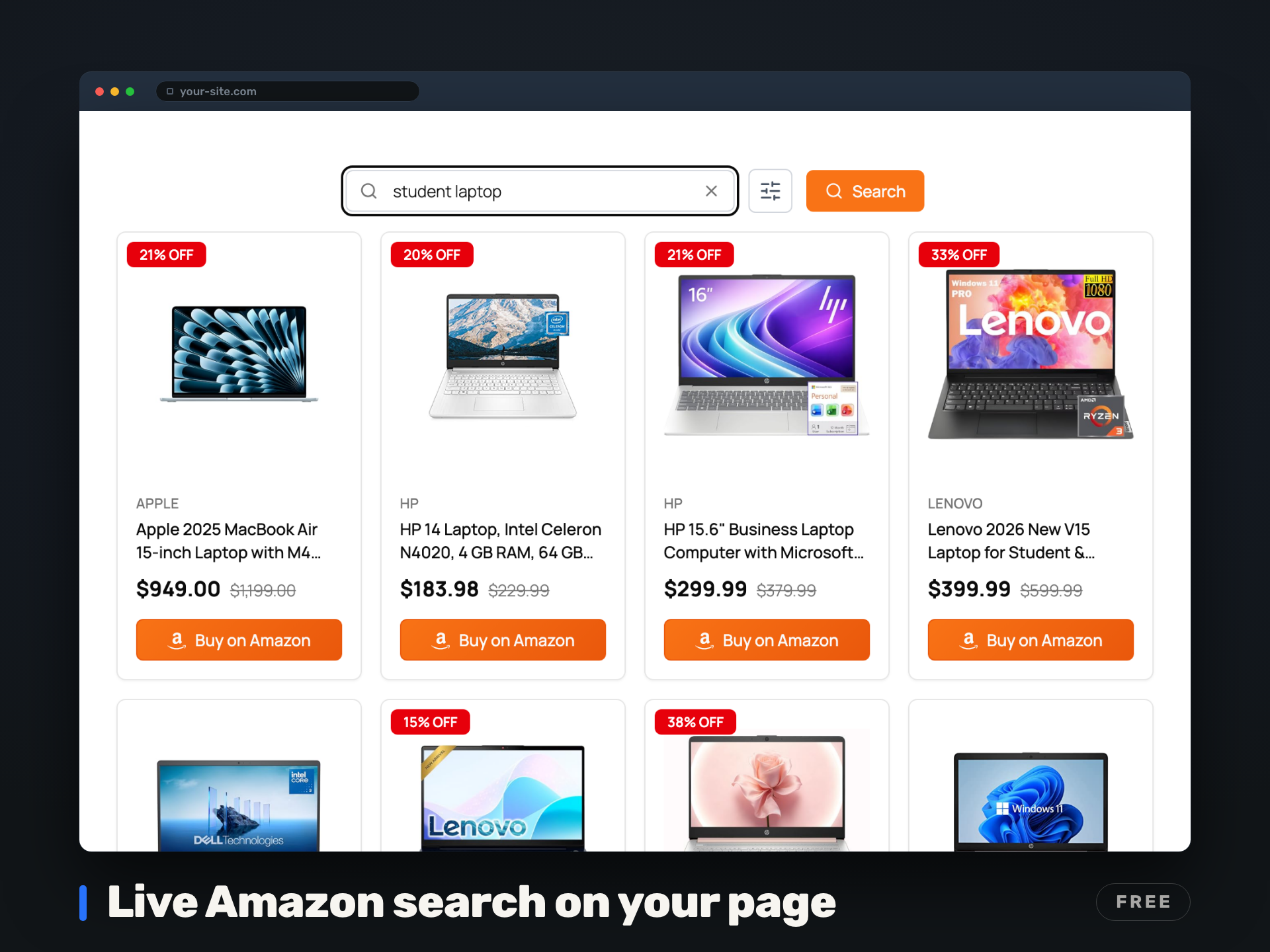
What sets it apart is live, on-site Amazon search. Add one shortcode and visitors search, filter, and browse Amazon’s catalog without leaving your page. Every product is automatically tagged with your Associate ID, and they click through to buy. You earn commissions on whatever they decide to buy, not just the products you manually linked.
One shortcode. No ASIN hunting. Works in minutes.
New: start with no Amazon API credentials at all. Our Managed API (Beta) returns live Amazon product results without setting up your own Amazon API credentials yet. Get started in 30 seconds, 20 searches a day and 600 a month free, and your Amazon Associate tag always stays yours.
Already approved for Amazon’s APIs? Bring your own Creators API (OAuth 2.0) or PA-API v5 credentials instead. Both paths live behind one toggle, so your site keeps earning through Amazon’s API transitions without rebuilding your pages.
Learn more, see live demos, and read the docs at https://paapiplugin.com/
Why Affiliates Use It
- Earn on every Amazon search, not just manual links – visitors discover products you never had to curate
- Keep visitors on your site – live Amazon product search reduces bounce rates
- Fast by default – build-time server-side rendering (SSR) means instant page loads
- Smart caching – search results cached 30 min, product data cached 1 hr, so your API quota stays healthy
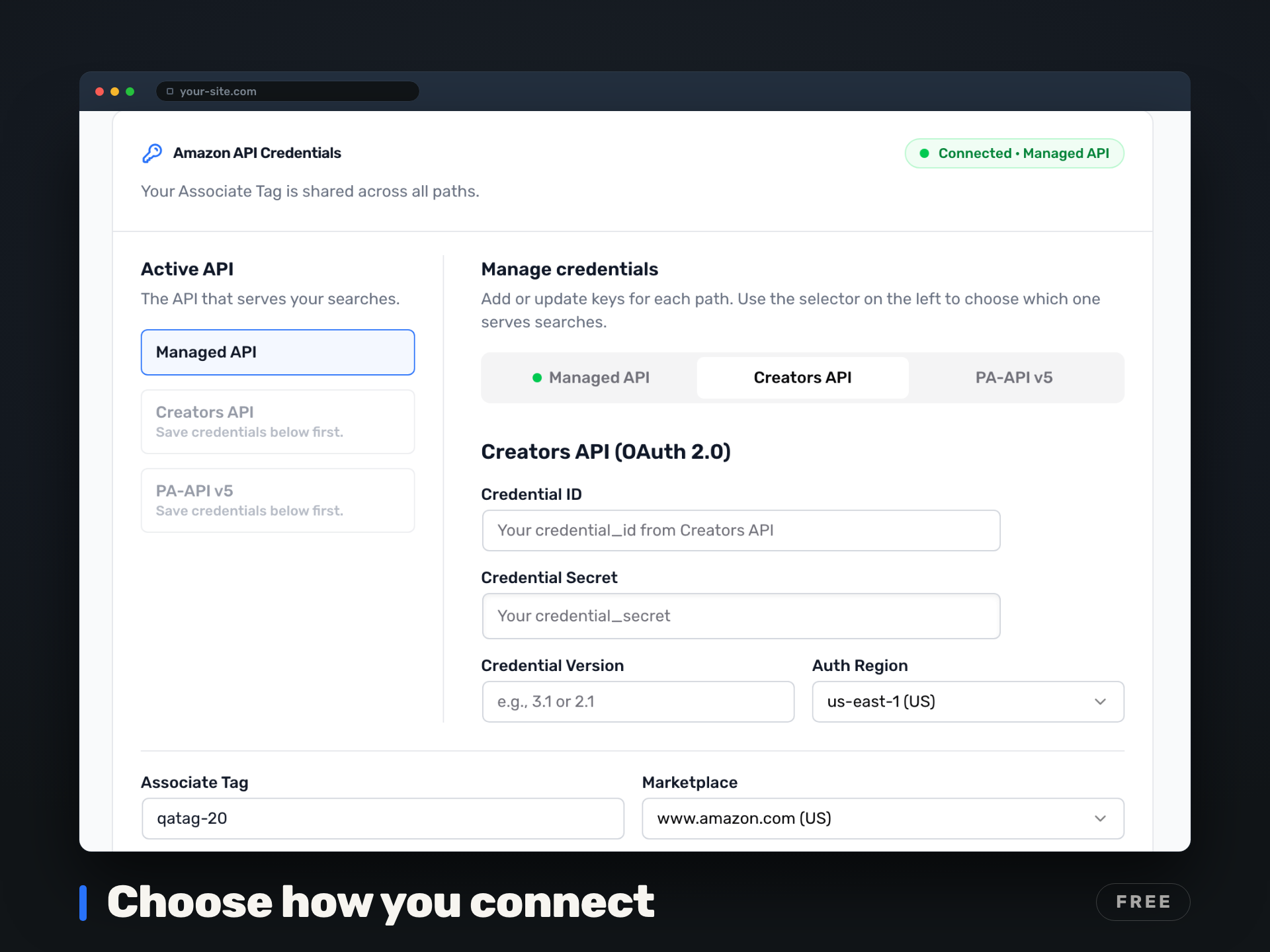
- Three ways to connect – our Managed API (Beta, no credentials), Amazon Creators API (OAuth 2.0, recommended), or legacy PA-API v5
Free Features
- Managed API (Beta) – real-time Amazon search with no Amazon API credentials needed yet and no AWS keys; 20 searches/day and 600/month free, your Amazon Associate tag stays yours
- Live Amazon product search with autocomplete suggestions
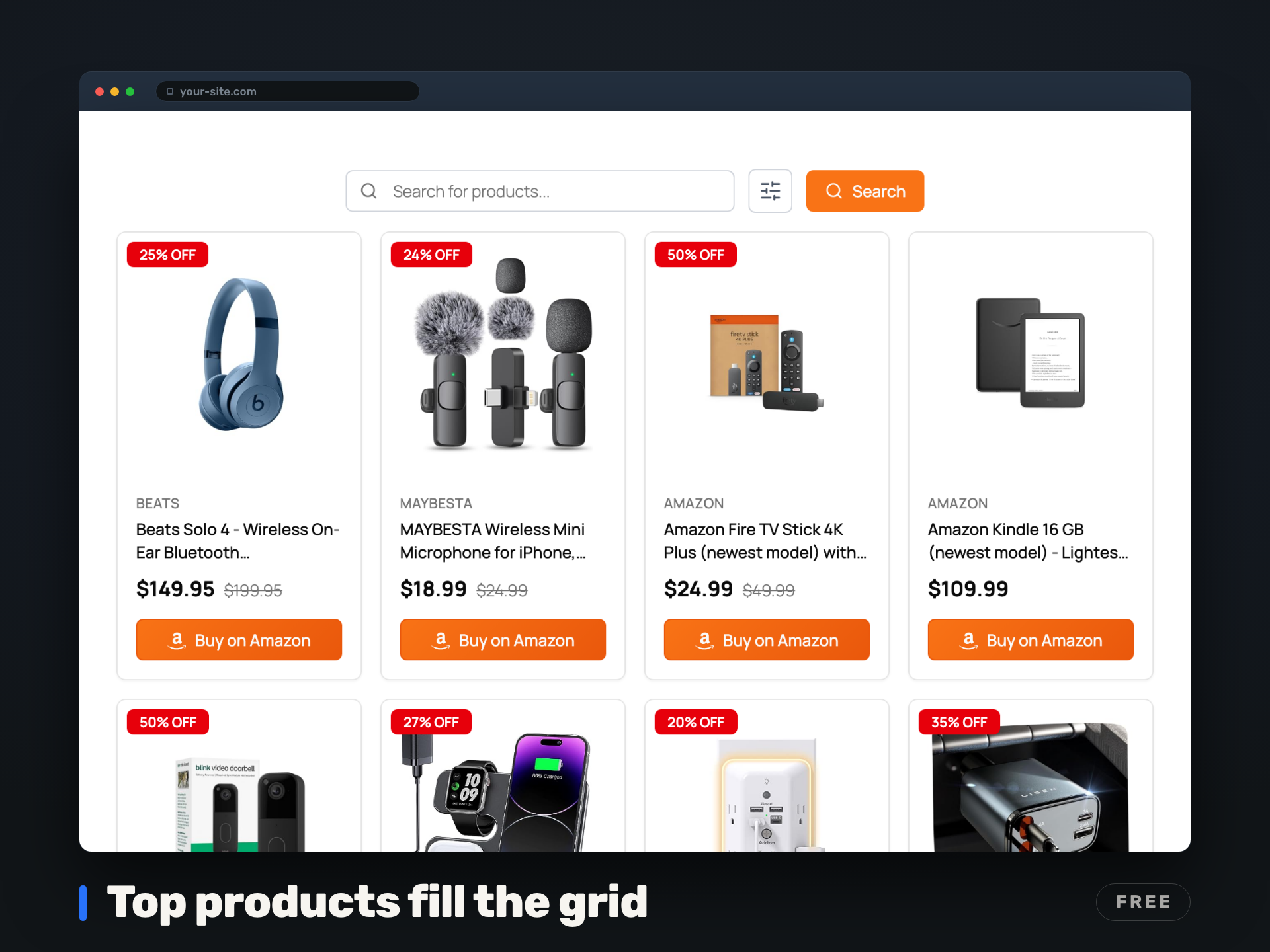
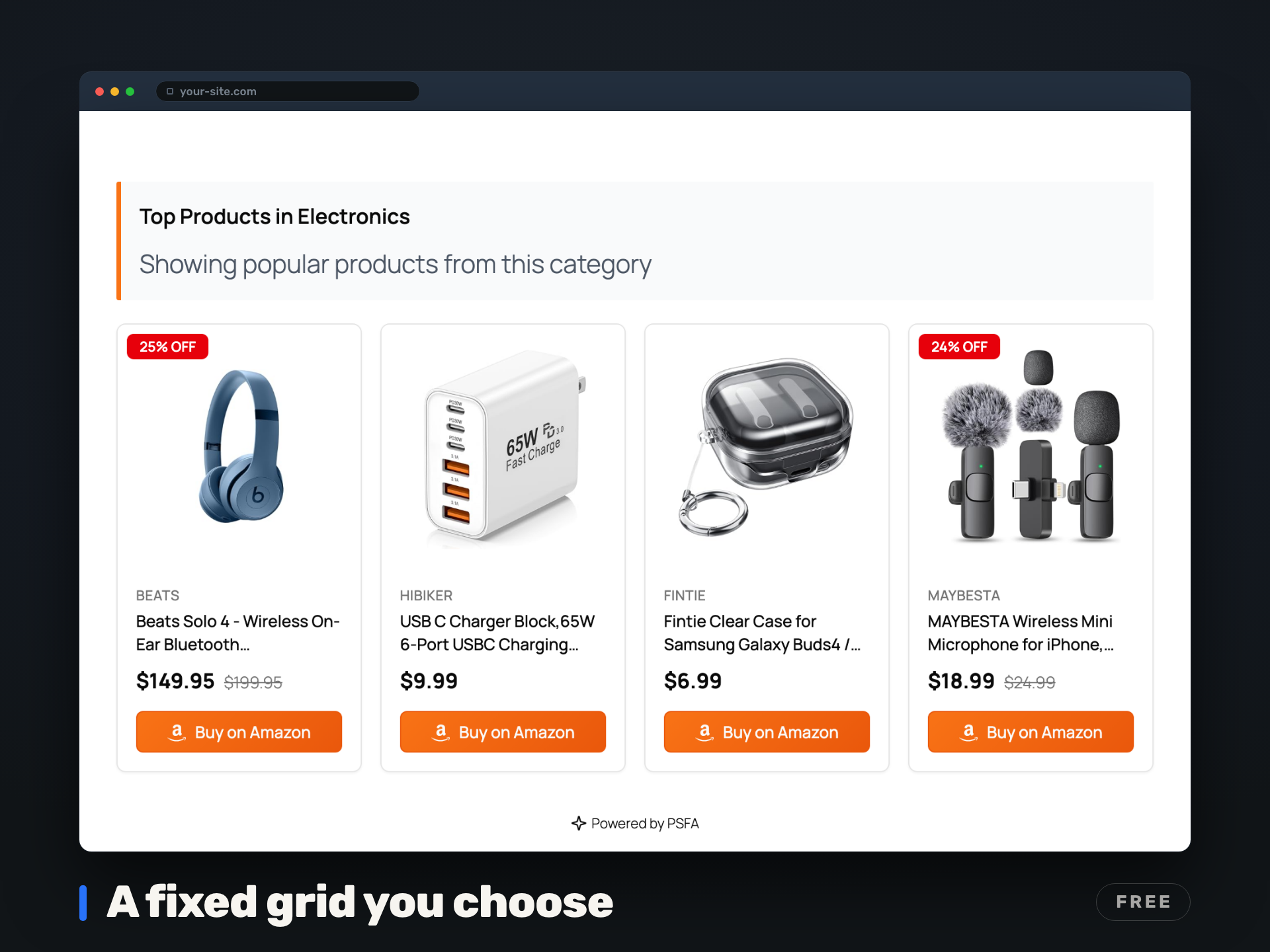
- Top Products Grid – with no query or category set, [psfa_search] shows a rotating grid of popular Amazon products across categories instead of an empty search box (the Top Products on Empty State setting, on by default); an instant Amazon storefront on any page
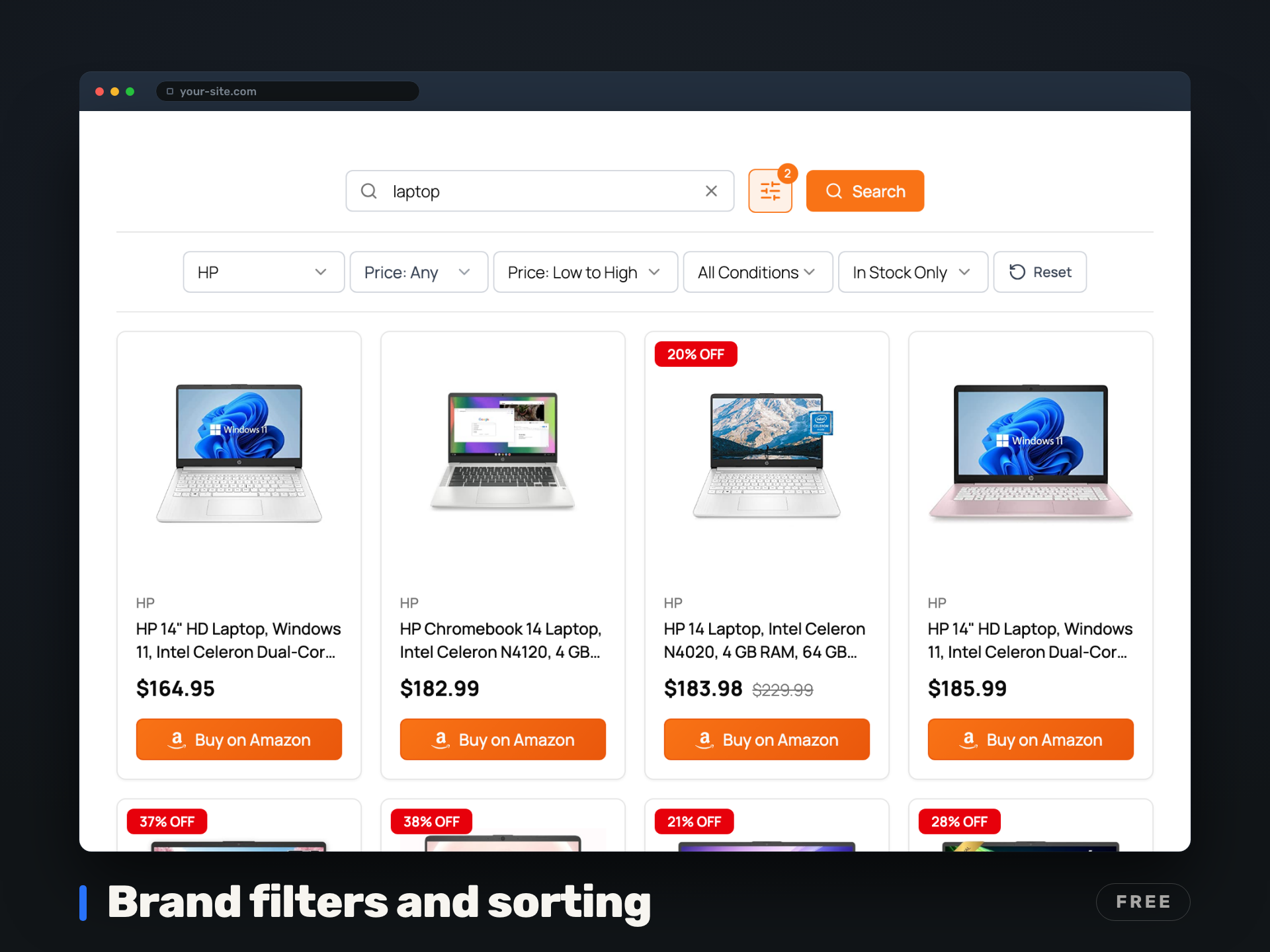
- Brand, price range, condition, merchant, and availability filters (Price Range, Condition, Merchant, and In-Stock apply when you bring your own Amazon credentials; see the Managed API FAQ)
- Sorting: Relevance and Customer Reviews everywhere; price sorting, Newest Arrivals, and Featured apply when you bring your own Amazon credentials
- Grid layout with responsive mobile-first design
- 5 categories (Electronics, Books, Fashion, Toys & Games, Home & Garden)
- Up to 50 products (5 pages) with infinite scroll, Load More, or no pagination
- Customizable product count (2-20 per page)
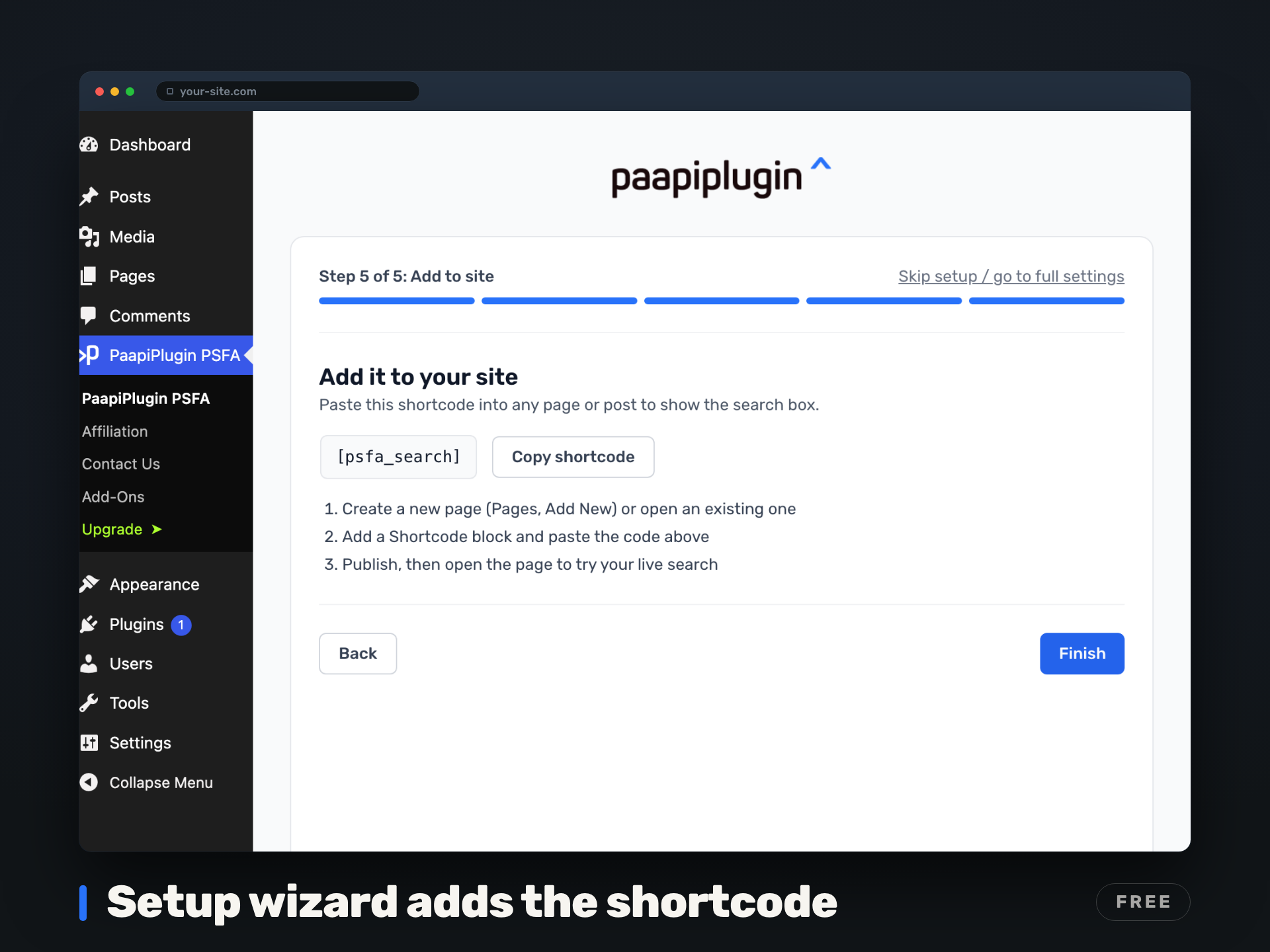
- Visual shortcode builder – no coding required
- Cache management page with usage monitoring
- One fixed theme preset: Neutral base color, Orange accent, Vega card style, 0.5 border radius, System Default font, light mode
Premium Features ($39/yr)
- Every Amazon category your store offers – the full department list for your marketplace, not just the free 5
- Extended pagination – up to Amazon’s 10-page ceiling (up to 100 products) with your own credentials; the Managed API (Beta) serves up to 5 pages
- List layout – vertical display for detailed product comparisons
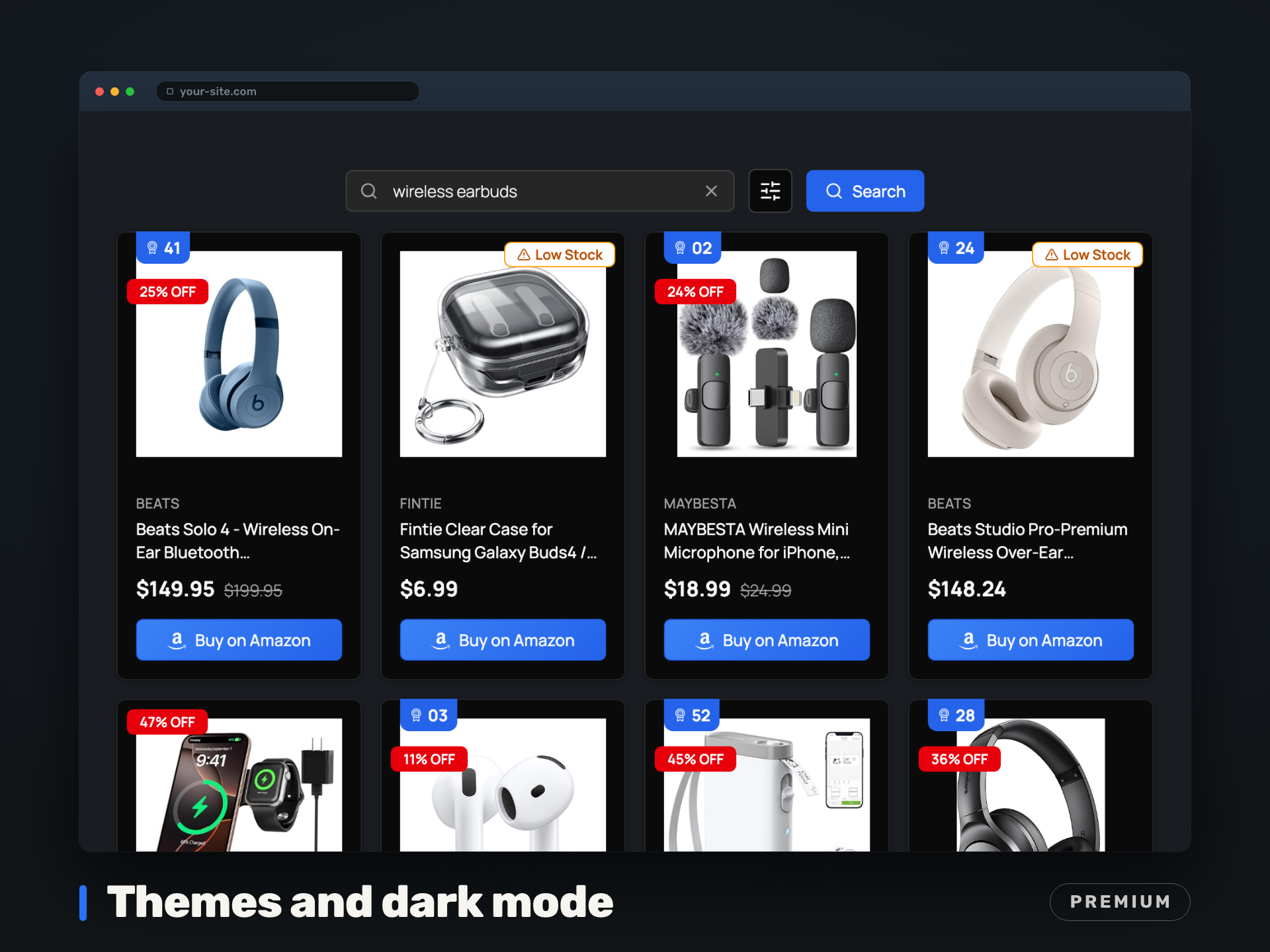
- Full appearance control – 5 base colors, 17 accent colors, 5 card styles, 5 border radius levels, dark mode, 16 fonts (15 Google Fonts + system default)
- Deal badges – Lightning Deal, Best Deal, Prime Exclusive, Low Stock warning, discount percentage, deal countdown timer (with your own Amazon credentials)
- Product badges – Prime, Best Seller rank (#1-100)
- Deals filters – let visitors narrow to products with active deals or a minimum discount (with your own Amazon credentials)
- White-label mode – remove all PSFA branding for a fully custom experience
- Button and display customization – custom button text, hide Amazon icon, hide category banner
Add-ons ($19/yr each, requires Premium)
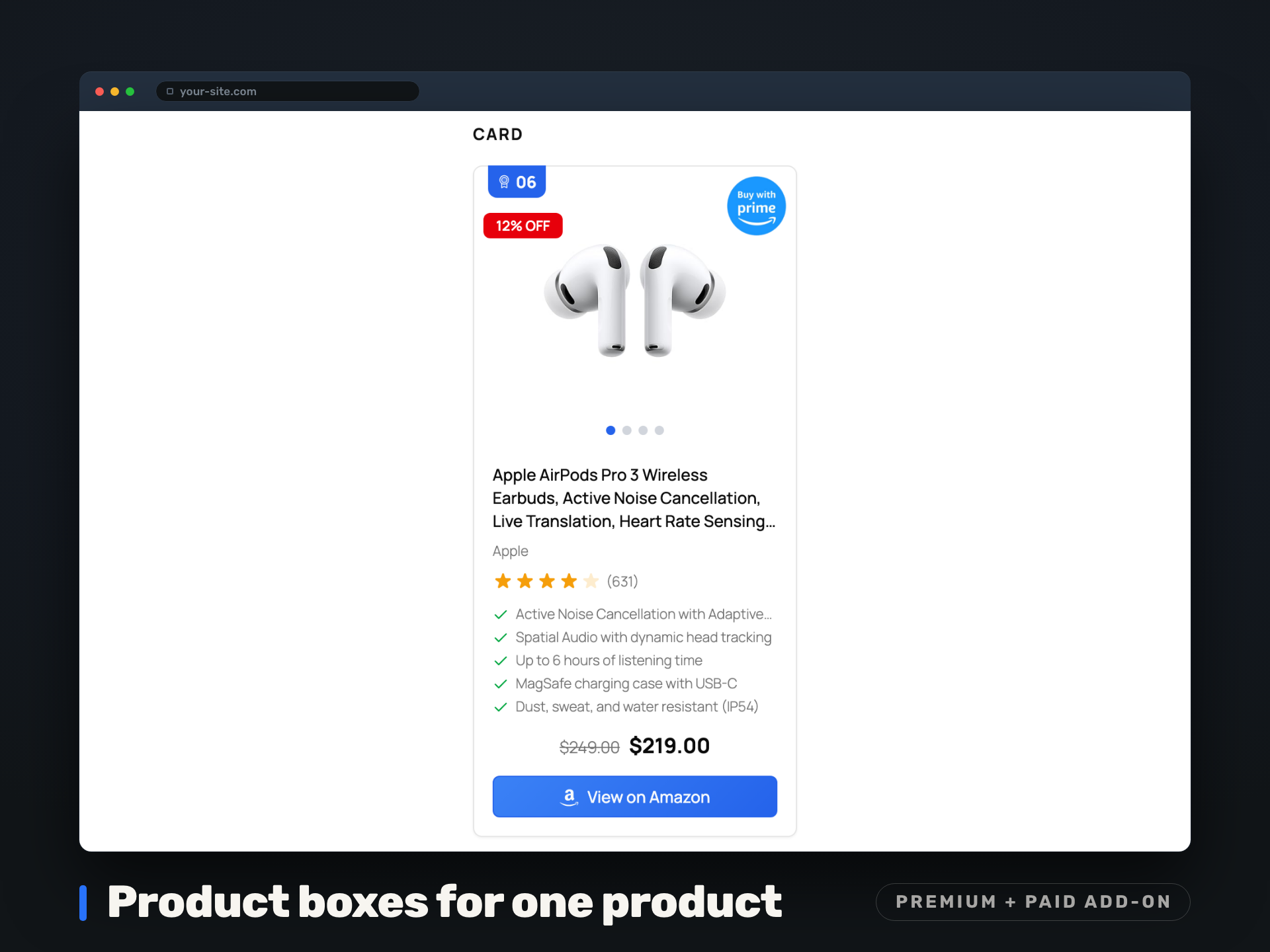
- Product Boxes – display individual Amazon products anywhere with shortcodes. Search-to-Save workflow, feature bullets, winner badges
- Comparison Tables – side-by-side product comparisons with winner badges, star ratings, responsive mobile layouts
- Analytics – track searches, clicks, impressions, and filter usage. Dashboard with charts, date picker, CSV/JSON export. Privacy-first, no cookies or PII
How It Works
- Install and activate the plugin
- Choose how to connect: turn on our Managed API (Beta) for instant search with no credentials, or enter your own Creators API or PA-API v5 credentials
- Add
[psfa_search]to any page or post - Your visitors search Amazon products and you earn commissions on every purchase
Requirements
- WordPress 5.8 or higher
- PHP 7.4 or higher
- cURL extension enabled
- An Amazon Associates account. For product data, use our Managed API (Beta, no credentials required) or bring your own Creators API or PA-API v5 credentials (Access Key ID, Secret Access Key, and Associate Tag)
Getting Amazon API Credentials
Using the Managed API (Beta)? You only need a free Amazon Associates account – no Amazon API credentials needed yet and no AWS keys. The steps below apply only if you choose to bring your own credentials instead.
To use this plugin, you’ll need to:
- Sign up for the Amazon Associates program
- Apply for API access at Creators API or Product Advertising API (PA-API v5) We support both!
- Once approved, you’ll receive your Creators API Client ID and Client Secret (or, for PA-API v5, an Access Key ID and Secret Access Key)
- Your Associate Tag is your Amazon Associates ID
Privacy & Security
- Your own Amazon API credentials (Creators API or PA-API v5) are encrypted at rest, and the raw key never reaches the browser
- On the Managed API (Beta), calls are server-to-server from your WordPress site to our proxy, which returns live Amazon product data tagged with your Associate ID. We never receive your site visitors’ IP addresses or personal data
- The Managed API uses a third-party Amazon product-data provider on the back end. Full detail is in our Privacy Policy and Managed API Usage Terms at paapiplugin.com
- The optional product-update email opt-in is the only marketing data we collect, and only if you check the box. It never affects your API key or service
- All requests use secure HTTPS connections
Support
For support, feature requests, or bug reports, please visit the plugin’s support forum on WordPress.org.
Credits
This plugin uses the Amazon Creators API (recommended) and the Amazon Product Advertising API 5.0 (PA-API 5.0) to search and retrieve product information. A Managed API option is also available, which connects through PaapiPlugin’s hosted proxy.
Third-Party Libraries
This plugin includes the following open-source libraries:
- shadcn/ui – UI component library (MIT License)
- Radix UI – Accessible UI primitives used by shadcn/ui (MIT License)
- Lucide React – Icon library (ISC License)
- Phosphor Icons – Duotone icon set, used for select inline SVG icons (MIT License)
- React – UI framework (MIT License)
- Tailwind CSS – Utility-first CSS framework (MIT License)
Source Code
The JavaScript bundles are built from TypeScript and React source files using the tools listed below.
Build tools used:
* Vite – For TypeScript/React bundling and minification
* Node.js – Runtime environment
* React 19 – Admin UI and frontend rendering
* Tailwind CSS v4 – Utility-first styling
* shadcn/ui – Accessible UI components built on Radix UI primitives
* Lucide React – Icon library used by UI components
* Phosphor Icons – Duotone icon set (inline SVGs)
External Services
This plugin connects to the following external services:
Amazon Product APIs (Creators API and PA-API 5.0)
This plugin uses Amazon’s Creators API (OAuth 2.0, recommended) or Product Advertising API (PA-API 5.0, legacy) to search and retrieve product information when you bring your own Amazon credentials. This is the core functionality of the plugin.
- What it does: Searches Amazon’s product catalog and retrieves product details (title, price, images, etc.)
- When data is sent: When a user performs a product search on your website
- What data is sent: Search queries, category selections, and filter parameters
- Service provider: Amazon.com, Inc.
- Terms of Service: https://affiliate-program.amazon.com/help/operating/agreement
- Privacy Policy: https://www.amazon.com/gp/help/customer/display.html?nodeId=468496
PaapiPlugin Managed API (Beta)
If you enable the optional Managed API, this plugin sends search requests to PaapiPlugin’s hosted proxy, which retrieves live Amazon product data on your behalf through a third-party Amazon product-data provider. You do not need your own Amazon API credentials on this path.
- What it does: Returns live Amazon product search and product detail data without requiring your own Amazon API credentials
- When data is sent: When a visitor performs a product search on your website (sent server-to-server from your WordPress site)
- What data is sent: Search keywords, ASINs, filter parameters, your Amazon Associate tag, your WordPress site URL, and your WordPress server IP address. End-visitor IP addresses and personal data are not sent.
- Service provider: PaapiPlugin (uses a third-party Amazon product-data provider on the back end)
- Terms of Service: https://paapiplugin.com/api-terms/
- Privacy Policy: https://paapiplugin.com/privacy-policy/
Amazon Autocomplete Suggestions
This plugin uses Amazon’s autocomplete API to provide search suggestions as users type.
- What it does: Provides real-time search suggestions based on user input
- When data is sent: When a user types in the search box (after 2+ characters)
- What data is sent: The partial search query text
- Service provider: Amazon.com, Inc.
- Service URL: https://completion.amazon.com/
- Terms of Service: https://www.amazon.com/gp/help/customer/display.html?nodeId=508088
- Privacy Policy: https://www.amazon.com/gp/help/customer/display.html?nodeId=468496
Google Fonts (Premium Feature)
Premium users can select custom fonts from Google Fonts for product display elements.
- What it does: Loads custom font files for typography customization
- When data is sent: When a page with the product search is loaded and custom fonts are configured
- What data is sent: Font family names
- Service provider: Google LLC
- Terms of Service: https://developers.google.com/terms
- Privacy Policy: https://policies.google.com/privacy
Privacy Policy
How product data is retrieved depends on the connection path you choose. When you bring your own credentials, product searches use your Amazon API credentials and product data comes from Amazon’s Creators API or PA-API. On the Managed API (Beta), search requests go to PaapiPlugin’s hosted proxy, which retrieves product data through a third-party Amazon product-data provider rather than Amazon’s official Creators API or PA-API. On that path we receive search keywords, your Amazon Associate tag, your WordPress site URL, and your WordPress server IP address, as listed in the External Services section above. We never collect, store, or transmit your site visitors’ personal data on either path. Please refer to the External Services section above for details on third-party services used by this plugin.
Скриншоттор
Орнотуу
Automatic Installation
- Go to Plugins Add New in your WordPress admin.
- Search for “Paapi Amazon Affiliate Product Search” (or upload the ZIP from WordPress.org once approved).
- Click Install Now and then Activate.
Manual Installation
- Upload the
paapi-product-search-for-amazonfolder to/wp-content/plugins/. - Activate the plugin through the Plugins menu in WordPress.
- Go to PaapiPlugin PSFA in your WordPress admin sidebar.
- Enter your Amazon API credentials (Creators API recommended, or PA-API v5), or enable the Managed API for no-credential setup.
- Add the shortcode
[psfa_search]to any page or post.
Premium Installation
Premium is a separate ZIP that you download from your account dashboard at paapiplugin.com after purchase. It is a full replacement for the free plugin, not an add-on, so only one copy of the plugin should ever be installed on a site.
- In Plugins Installed Plugins, click Deactivate on the free “Paapi – Amazon Affiliate Product Search, Product Boxes, Comparison Tables & Analytics” plugin.
- Click Delete on the now-deactivated free plugin. Your settings and API credentials are kept: the plugin stores them in the WordPress database and removes nothing when you delete it, so the premium version picks them up on activation.
- Go to Plugins Add New Upload Plugin, choose the premium ZIP you downloaded, and click Install Now.
- Click Activate Plugin.
- Activate your license when the plugin prompts you after activation. If you are not prompted, open Account under PaapiPlugin PSFA in your WordPress admin sidebar.
Uploading the premium ZIP through Plugins Add New Upload Plugin is safe on its own. WordPress replaces the existing plugin folder in place, so you never end up with two copies.
Do not leave a second copy of the plugin in a differently named folder. If you unzip the premium build by hand, or upload it over FTP into a folder such as /wp-content/plugins/paapi-product-search-for-amazon-pro/ while the original /wp-content/plugins/paapi-product-search-for-amazon/ is still there, WordPress sees two copies of the same plugin. Activating the second one while the first is active produces:
Plugin could not be activated because it triggered a fatal error.
The fix is the sequence above: deactivate the free version, delete it, then install the premium ZIP.
Configuration
- Open PaapiPlugin PSFA in your WordPress admin sidebar.
- Select your Authentication Type:
- OAuth 2.0 (Creators API) – Recommended for new users
- AWS Signature V4 (PA-API) – Legacy authentication method
- For OAuth 2.0 (Creators API):
- Enter your Client ID and Client Secret from Creators API
- Enter your Credential Version (typically “1”)
- Select your Auth Region and Marketplace
- For AWS Signature V4 (PA-API):
- Enter your Access Key ID and Secret Access Key
- Enter your Associate Tag (your Amazon Associates ID).
- Click Test Connection to verify your credentials work.
- Click Save Settings.
- (Optional) Customize appearance in the Appearance tab (base color, accent, radius, dark mode, font).
FAQ.KG
-
How is this different from other Amazon affiliate plugins?
-
Most Amazon plugins (AAWP, AzonPress, AmaLinks Pro) display products you already know about – you pick ASINs, embed them, done. This plugin adds live search. Visitors find products themselves, browse, filter, and click through to buy. You earn commissions on products you never had to manually curate. Use it alongside your existing plugin or replace the ASIN-hunting workflow entirely.
-
Do I need Amazon API credentials to use this plugin?
-
No. Our Managed API (Beta) runs live Amazon product search with no Amazon API credentials needed yet and no AWS keys. You still need a free Amazon Associates account so commissions are tagged to you, and your Amazon Associate tag is always yours. If you already hold Creators API or PA-API v5 credentials, you can bring your own instead with one toggle in the plugin admin.
-
Do I need an Amazon Associates account?
-
Yes, a free Amazon Associates account is always required so commissions are tagged to you. For product data you can use our Managed API (Beta, no credentials needed) or your own Creators API (or legacy PA-API v5) credentials. Either way, your Associate Tag tags every product link with your affiliate ID.
-
How do I get Amazon API credentials?
-
- Sign up for Amazon Associates
- Apply for Creators API (recommended) or PA-API v5 access
- Enter your credentials in the plugin settings and click Test Connection
-
Will this slow down my site?
-
No. The frontend uses build-time server-side rendering (SSR) – the initial HTML is pre-rendered, so the first paint is instant. Smart caching (30 min for searches, 1 hr for products) means repeat visits load in milliseconds. Your API quota stays healthy and your pages stay fast.
-
What’s included in the free version?
-
The free version is a real product, not a crippled trial. You get live Amazon search with autocomplete, 5 categories, 50 products, brand/price/condition filters (price and condition filters apply when you bring your own Amazon credentials), sorting, infinite scroll, caching, responsive grid layout, and a visual shortcode builder. Premium adds every category your Amazon store offers, 100 products, deal badges (with your own Amazon credentials), full appearance customization, list layout, and white-label mode.
-
Can visitors see products without searching first?
-
Yes. With no query and no category set, [psfa_search] shows the Top Products Grid: a rotating grid of popular Amazon products across categories instead of an empty search box, so any page becomes an instant Amazon storefront. This is the Top Products on Empty State setting, on by default. To force the grid on when that setting is off, use [psfa_search mode=”top”]. If you set a category, it shows popular products from that category instead. Either way, visitors can search or filter from there and every product link carries your Amazon Associate tag.
-
Can I customize how it looks on my site?
-
Yes. The plugin has a 6-axis appearance system. Free users get the Neutral base with orange accent. Premium users control all 6 axes: base color (5 options), accent color (17 options), card style (5 presets), border radius, dark mode, and font (15 Google Fonts + system default). The 6-axis system matches any WordPress theme.
-
Does it work with caching plugins?
-
Yes, but you may need to exclude pages with the
[psfa_search]shortcode from full-page caching, since the search functionality requires dynamic content. -
Can I use it on multiple sites?
-
Yes. Each site needs its own license and Amazon API credentials.
-
What happens if Amazon changes or retires the PA-API?
-
We recommend the Creators API (OAuth 2.0), Amazon’s current product API, or our Managed API (Beta), which needs no credentials at all. PA-API v5 (AWS Signature V4) is Amazon’s older method; if you still have working PA-API credentials the plugin continues to support them. You can switch between any of these in the plugin admin without rebuilding your pages, so your site keeps earning through Amazon’s API transitions.
-
Do I need to manually maintain product lists or hunt for ASINs?
-
No. That is the point of search. Visitors type what they want and see live Amazon results filtered by brand, price, and condition. You never need to pick ASINs or keep a product list updated. Every click still carries your Associate tag, so you earn on whatever they decide to buy.
-
Why don’t I see the Condition, Merchant, and In-Stock filters on the Managed API?
-
On the Managed API path, the managed search data does not include per-item condition (new/used/refurbished), seller/merchant, or stock-availability detail, so the Condition, Merchant, and In-Stock filters would have no effect. To avoid showing controls that do nothing, they are hidden automatically when you use the Managed API. These filters remain available when you connect your own Amazon credentials (Creators API or PA-API v5), where Amazon provides that data.
-
Why don’t I see the Newest Arrivals and Featured sort options on the Managed API?
-
On the Managed API path, the managed search data does not include per-item release dates, so Newest Arrivals has no signal to sort by, and Featured matches the default Relevance order. To avoid offering sorts that do nothing, both are hidden automatically on the Managed API. They remain available when you connect your own Amazon credentials (Creators API or PA-API v5). The Customer Reviews sort remains available on the Managed API and is applied by Amazon’s own search when results are fetched.
Сын-пикирлер
There are no reviews for this plugin.
Contributors & Developers
“Paapi – Amazon Affiliate Product Search, Product Boxes, Comparison Tables & Analytics” is open source software. The following people have contributed to this plugin.
Мүчөлөрү
Interested in development?
Browse the code, check out the SVN repository, or subscribe to the development log by RSS.
Өзгөртүүлөр
2.29.3
- Changed: The plugin’s name in the WordPress.org directory and on your Plugins screen is now “Paapi – Amazon Affiliate Product Search, Product Boxes, Comparison Tables & Analytics”. Nothing about how the plugin works has changed. Your settings and shortcodes are untouched.
- Changed: The settings page title now uses the new name, and the message shown when your Amazon credentials are missing now points to PaapiPlugin PSFA API Credentials, where you enter them.
- Note: Product Boxes 1.5.3, Comparison Tables 1.5.3 and Analytics 1.0.6 go with this release. Their notices and readmes now use the new name.
2.29.2
- Fixed: A deal that ended while the page was cached left a small empty red pill on the product image, and a deal label that arrived blank from Amazon left an empty orange one. Neither is drawn now unless there is something to show.
- Changed: The overview video on this listing now shows what the free version does. The previous video included Premium-only screens without saying which ones they were.
- Note: Product Boxes 1.5.2 and Comparison Tables 1.5.2 go with this release. Product Boxes carries the same deal badge fix. Comparison Tables no longer draws an empty strip of header above a table that has no winner marked on it. Analytics is unchanged.
2.29.1
- Fixed: The plugin’s warnings about a problem on your site were hidden on the screen where you enter an add-on licence key. A Managed API problem, an unsupported marketplace, and a Premium licence that has dropped back to free are now shown on that screen as they are everywhere else.
- Fixed: The free version could still show the List layout on some pages. List is a Premium layout, and the free version now shows the grid instead. A saved List setting is left as you set it and applies again once Premium is active.
- Note: Product Boxes 1.5.1, Comparison Tables 1.5.1 and Analytics 1.0.5 go with this release. Each of them now explains on that same licence screen why it will not run.
2.29.0
- Fixed: A product that cannot be loaded no longer vanishes from the page. A product box shows a placeholder card in its place, and a comparison table keeps the row instead of quietly dropping it.
- Fixed: Search no longer asks a visitor to change their search when the products could not be loaded at all. That message was only ever right for a search that genuinely had no matches.
- Added: When you are signed in as an administrator and looking at your own page, you now see the real reason a product could not be loaded and what to do about it. Visitors see one short, neutral line instead.
- Changed: The Amber, Yellow and Lime accents now use white button text on the front end, matching what the Appearance preview shows and the rest of the accent colours.
- Fixed: A site that has reached its Managed API limit no longer keeps asking for products it cannot get. It could previously go on making refused requests in the background all day. It now holds off until the limit resets, and in any case tries again within the hour, so a raised limit or an upgrade takes effect on its own. Use Test Connection on the API Credentials screen to check straight away.
- Changed: The two Managed API usage emails, the one at 80% of your limit and the one when the limit is reached, are no longer sent by the plugin. They went out through your own site’s mail, so on a site with no mail set up they never arrived and nothing said so. The dashboard notices for both are unchanged. Emails about your connection and about service problems still come from the plugin as before.
- Changed: A product that is temporarily unavailable and one that no longer exists now say different things, so a passing problem is not mistaken for a listing you need to replace.
- Fixed: A product Amazon cannot resolve now shows as unavailable every time it is displayed. It could previously come back as a half-filled product with a working buy button, pointing at something that is not there.
- Note: After you fix or replace an ASIN that was showing as unavailable, the page can take up to about fifteen minutes to catch up. Use Clear Cache on the plugin’s Cache screen to see the change straight away.
- Note: Update Product Boxes to 1.5.0 and Comparison Tables to 1.5.0 alongside this release. Both require this version.