Сүрөттөө
QBlocks Menu Sync for Polylang adds a “Duplicate Menu” panel to the WordPress Appearance > Menus screen. Clone any navigation menu — including all items, hierarchy, and settings — in seconds, with full Polylang multilingual support.
This plugin is not affiliated with Polylang or its developers. “Polylang” is a trademark of its respective owner; this plugin simply integrates with the Polylang plugin’s public API.
Features
- One-click menu duplication — duplicate any menu with all items preserved
- Polylang integration — clone menus to one or more target languages in a single action
- Smart translation — automatically links to translated pages, posts, and taxonomy terms when available
- Fallback handling — keeps original linked objects when no translation exists
- Custom links — duplicated as-is with no changes
- Theme location assignment — optionally assign the cloned menu to any registered theme location
- Polylang-aware locations — assigns per-language location slots without affecting other languages
- Unique naming — auto-generates unique menu names to prevent conflicts
- Source language badge — clearly shows which language you are cloning from
- Secure — nonce verification, capability checks, input sanitization, and output escaping throughout
How It Works
- Go to Appearance > Menus
- Select the menu you want to duplicate
- Open the Duplicate Menu panel (above the menu structure)
- Choose target languages (if Polylang is active)
- Optionally set a custom name and assign theme locations
- Click Duplicate Menu
Polylang Support
When Polylang is active, the plugin detects the source menu’s language and offers all other active languages as targets. For each target language:
- Pages and posts are automatically linked to their translation
- Categories and custom taxonomy terms are linked to their translation
- If no translation exists, the original object is kept as a fallback
- Custom links are duplicated unchanged
- The new menu is assigned the correct Polylang language
Without Polylang
The plugin works as a simple menu duplicator — no language features, just a clean copy of the menu and all its items.
Скриншоттор
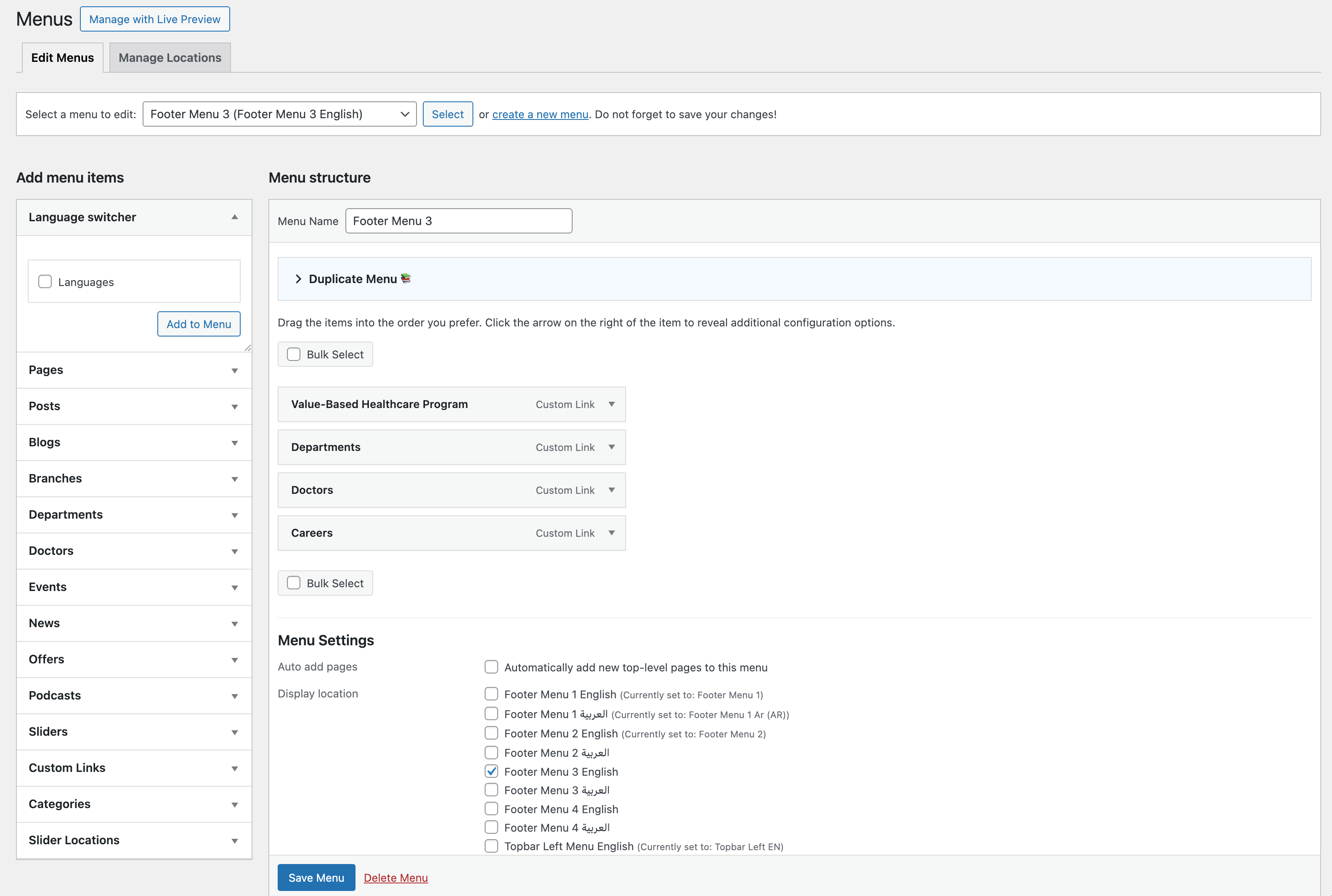
Duplicate Menu panel on the Menus screen (collapsed) 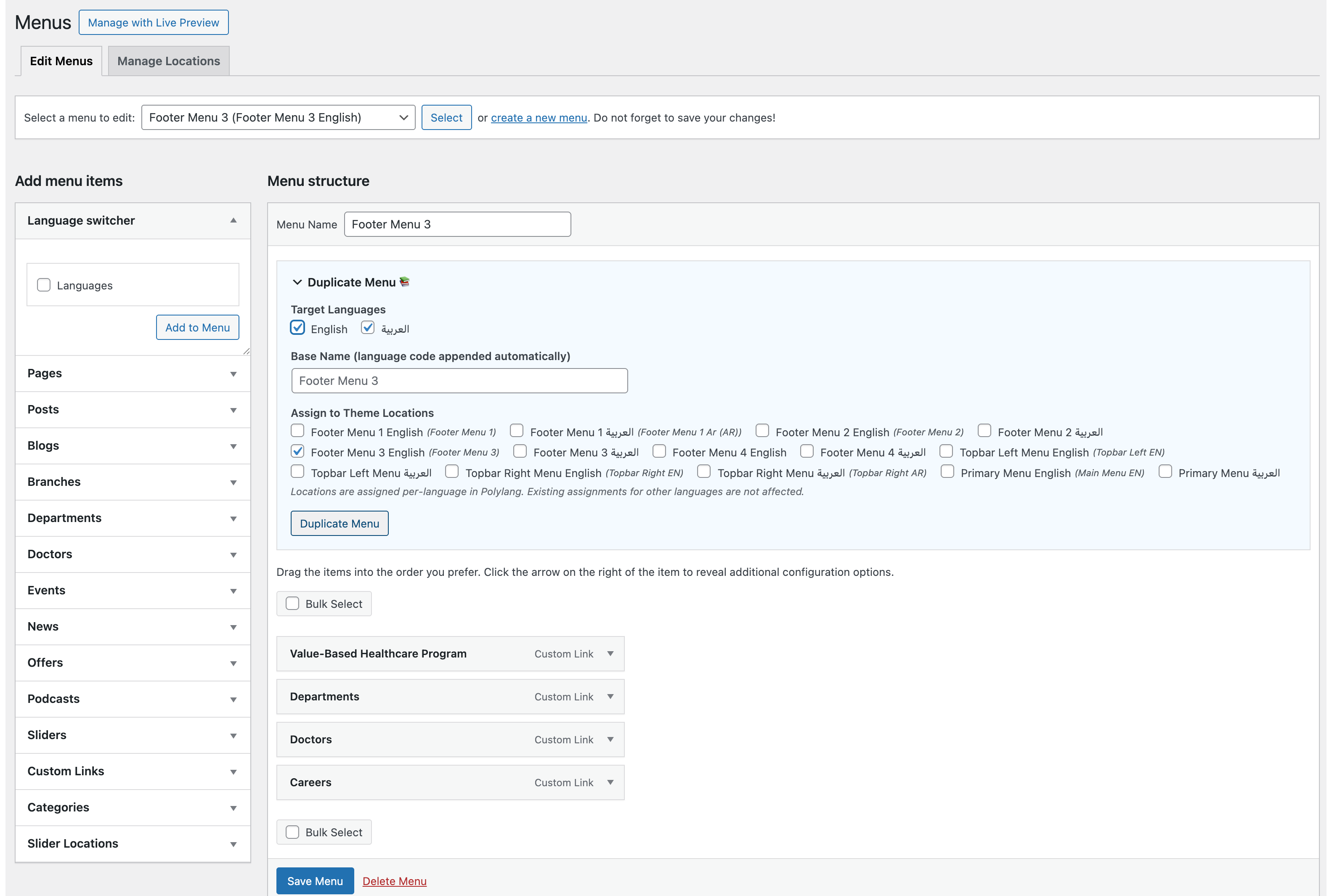
Duplicate Menu panel expanded with Polylang languages and location options
Орнотуу
- Upload the
qblocks-menu-sync-for-polylangfolder to/wp-content/plugins/. - Activate the plugin through the Plugins menu in WordPress.
- Go to Appearance > Menus — the Duplicate Menu panel appears above the menu structure.
FAQ.KG
-
Does this plugin require Polylang?
-
No. Without Polylang, it works as a straightforward menu duplicator. Polylang integration is optional and activates automatically when Polylang is detected.
-
Is this plugin affiliated with Polylang?
-
No. This plugin is independently developed and is not affiliated with, sponsored by, or endorsed by Polylang or its developers. It simply uses the public Polylang API.
-
Yes. When Polylang is active, you can check multiple target languages and the plugin creates one menu per language in a single action.
-
What happens if a page does not have a translation?
-
The menu item keeps the original (source language) page as a fallback. You can update it manually later when the translation is created.
-
No. The plugin always creates new menus with unique names. It never modifies or deletes existing menus.
-
Yes. The Duplicate Menu panel shows all registered theme locations as checkboxes. In Polylang mode, only the target language’s location slot is affected — other languages remain untouched.
Сын-пикирлер
There are no reviews for this plugin.
Contributors & Developers
“QBlocks Menu Sync for Polylang” is open source software. The following people have contributed to this plugin.
Мүчөлөрү
Translate “QBlocks Menu Sync for Polylang” into your language.
Interested in development?
Browse the code, check out the SVN repository, or subscribe to the development log by RSS.
Өзгөртүүлөр
1.0.0
- Initial release
- Menu duplication with full item hierarchy preservation
- Polylang integration with automatic object translation
- Multi-language cloning in a single action
- Theme location assignment with Polylang-aware per-language slots
- Source language badge display
- Confirmation dialog and double-submit protection