

Сүрөттөө
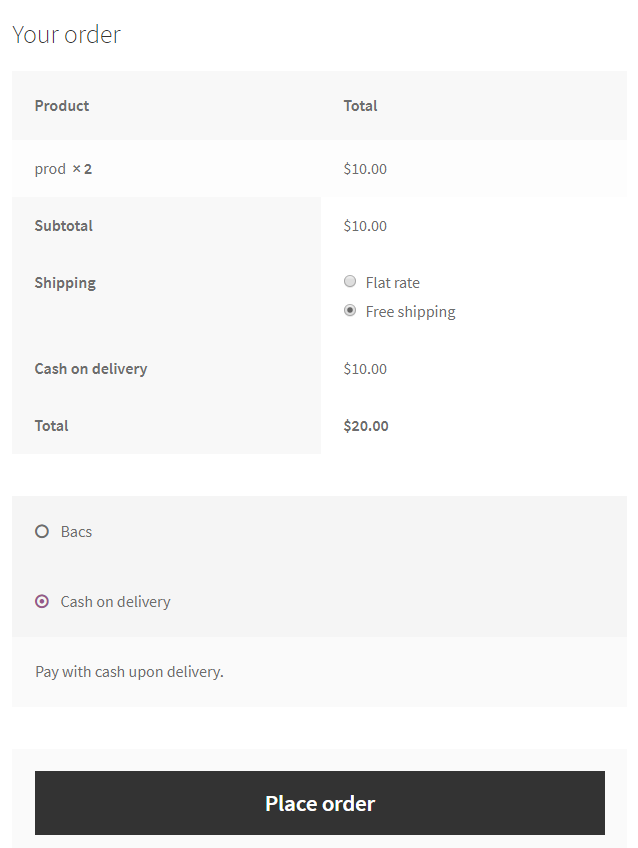
Smart COD for WooCommerce extends the WooCommerce Cash on Delivery (COD) Gateway with an optional extra fee and restrictions based on customer conditions such as location and selected shipping method.
Supports both Classic Checkout and WooCommerce Cart & Checkout Blocks (WooCommerce 9.9+ for Blocks). The same COD restrictions and extra fees apply to both checkout types.
Whether you’re managing a small shop or a large e-commerce business, this plugin helps you fine-tune your Cash on Delivery service to cater to a wide range of scenarios and requirements.
A common challenge faced by WooCommerce store owners is the inability to apply an extra fee for the Cash on Delivery (COD) payment method. This is a critical feature for many e-commerce shops, as charging an additional fee for COD is a standard practice.
The plugin also offers configurable restrictions so merchants can decide when COD is available.
A separate Smart COD PRO plugin is available outside the WordPress.org directory. It adds advance-payment COD, multiple conditional extra fees (including country, shipping-zone and shipping-method pricing, cart-amount thresholds and order-pay handling), CSV restriction imports, and cart amount, product quantity, customer-role, stock, backorder and coupon rules. These features are part of the separate PRO plugin, not locked options in this Free plugin.
Restrictions
Each restriction can be easily toggled between Enable and Disable. When set to Enable, the restriction will allow the Cash on Delivery (COD) payment option only for the specified selections. On the other hand, when set to Disable, the restriction will disable the COD option for the specified selections, making it unavailable for them.
- Shipping Zone
- Shipping Method inside Shipping Zone
- Country
- State
- Postal Code (Supports Ranges)
- City
- User Role
- Products in cart (Supports Variations)
- Categories of the products in cart
- Shipping Class
You can define an informational message to display before the payment methods, when the COD method is not available for a customer.
You can define different messages per restrict reason.
Extra Fees
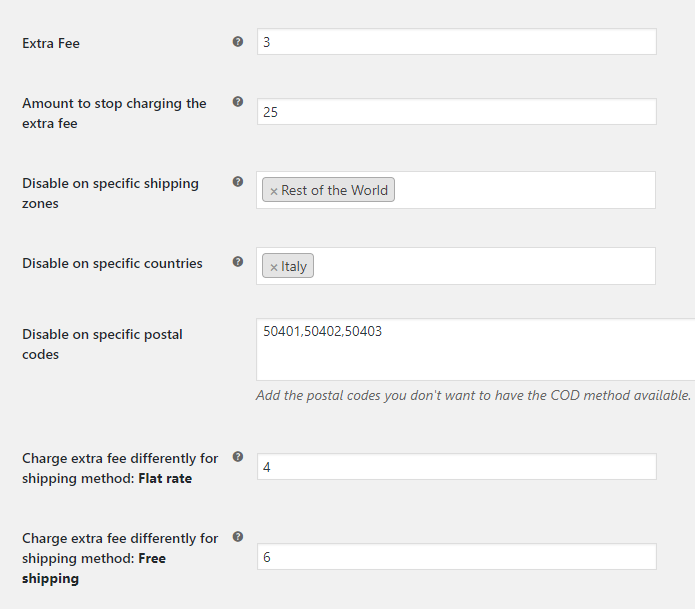
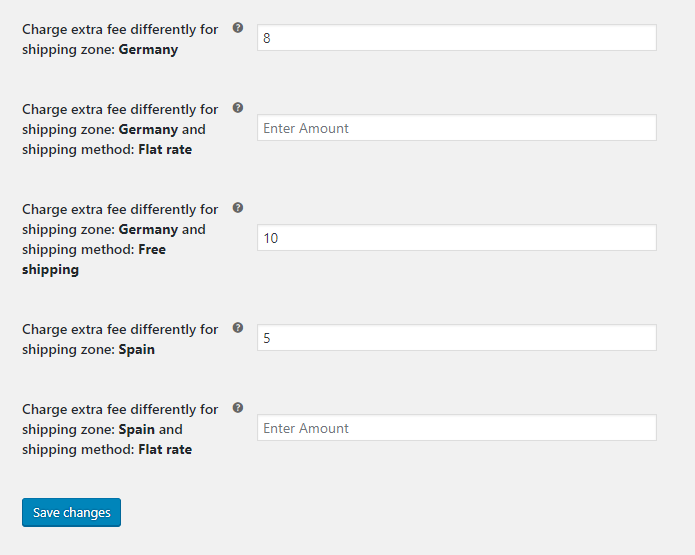
You can configure a standard extra fee and a separate fee for local pickup.
You can use a fixed price or a percentage of the customer’s cart amount.
You also have a nice rounding option.
You can enable tax for this fee.
Developer-Friendly
The plugin integrates seamlessly with WooCommerce and uses a clean, object-oriented codebase. It also provides the following filters for easy customization:
wc_smart_cod_fee: Alter the extra fee.wc_smart_cod_available: Alter the current COD restriction.wc_smart_cod_fee_title: Change the COD fee title.
Since the plugin extends the existing WooCommerce Cash on Delivery Gateway, there’s no need to enable or disable gateways manually.
External services
COD Protection and order-history sharing are optional and off by default in Free and PRO. Enabling the sharing setting in Cash on Delivery settings registers the installation with api.woosmartcod.com and permits the collection described below. Collection includes future physical COD creation snapshots and subsequent outcomes in signed background batches, without requiring tracking or a 24-hour wait. The existing filtered cancellation relay still sends eligible historical and future cancellation evidence and a capped prior-completed tracked COD count for the same shopper at that shop. An existing enabled sharing setting applies to this collection after updating, without another activation step or expansion notice; disabled settings remain disabled. Registration includes a generated installation identifier, shop domain, operating country and public signing key. Events include pseudonymized customer/location identifiers, a non-reversible order reference, timestamps, totals/currency, shipping method, item count, guest/registered status and courier/tracking where available. The service validates signed submissions, deduplicates events and applies an additional secret-keyed transformation to identity tokens. Data supports same-store COD protection and, subject to server-side eligibility review, cross-store machine-learning training; collection does not activate live ML scoring. No individual shop could perform that cross-shop processing locally.
When COD Protection is enabled and checkout contains an email address or telephone number, the plugin sends locally generated SHA-256 identity tokens, the installation identifier and operating country to the COD Protection endpoint. Raw email and telephone values are not sent. The service checks only eligible events belonging to that same installation and returns only an allow/disable decision with a decision reference and policy metadata, not customer-history counts. The service records aggregate decision statistics and pseudonymized supporting evidence for denials, rather than storing every raw checkout lookup request. A timeout, invalid response or unavailable service leaves Cash on Delivery available. Turning the option off stops future collection, transmission and checkout lookups. The plugin does not call courier APIs.
Service information: cancelled COD service privacy details, Terms and Conditions and Privacy Policy.
COD Protection, successful history and order lifecycle
Classic shortcode checkout remains supported. Cart and Checkout Blocks are also supported on WooCommerce 9.9 or newer through the native Store API and Blocks extension APIs. The same COD rules, fees and optional order-lifecycle collection apply to both checkouts. Third-party gateways and checkout fields require their own Blocks support.
Changes in this release: collection expands from filtered cancellation evidence to prospective physical COD creation and outcome events. The successful-history allowance adds context so earlier cancellations are not considered in isolation. This prepares representative data for cross-store machine-learning training; receiving data does not automatically activate ML scoring at checkout.
New lifecycle events do NOT require tracking or a 24-hour wait. A new physical COD order created and cancelled within minutes is still recorded whenever the sharing setting is enabled. Other payment methods, virtual-only orders and deposit-child orders are excluded. Existing historical cancellations retain their filtered relay: this release does not import all past creations or completed orders.
Collection and COD restriction are different. Not every collected cancellation is a qualifying negative match. The existing shipment/fulfilment checks remain: tracking, a prior physical-order completed status or a shipped/fulfilled transition. The lower-confidence untracked fallback applies only without a recognized tracking integration, after at least 24 hours between creation and cancellation, with a fulfilment-stage source status when supplied. Tracking AND 24 hours are not universal joint requirements. A cancellation by itself is not proof of refusal or non-delivery.
Optional, off by default, and identical in Free and PRO. Protection checks only this installation. When the existing sharing setting is enabled, the plugin sends future physical COD creation snapshots and later status/outcome changes (including completed, cancelled, refunded and reopened orders) to api.woosmartcod.com in signed background batches. Creation snapshots include pseudonymized email/telephone and postcode identifiers, order reference, timing, totals/currency, shipping method, item count and guest/registered status. Courier names and tracking codes are included where available. Raw customer email, telephone and names are not sent. Data is used for COD protection and, subject to server-side eligibility review, cross-store machine-learning training.
There is one sharing setting. After updating, stores that already enabled sharing also collect future physical COD creation snapshots and subsequent outcomes, without a separate activation or upgrade notice. Stores with sharing disabled remain disabled. Switching sharing off stops future capture, transmission and checkout checks. Historical cancellations keep their existing compatibility relay. Old orders first observed after the update or activation are marked as late observations, not invented checkout snapshots.
The configurable successful-history allowance uses only directly matching email or telephone in this store and affects only the history-based restriction. Default minimum rate: 100%, preserving the existing history restriction unless the merchant chooses a lower rate (50% to 100%). Nine known successful orders and one qualifying dispatched-then-cancelled order meet 90%. Pending orders do not count. WooCommerce completed status is merchant-reported, not automatically courier-confirmed. New completion rows and cumulative historical snapshots are not summed: the service uses a conservative maximum to avoid counting the same deliveries twice. Exact individually imported historical success coverage may therefore be incomplete.
Checkout calls contain hashed identifiers, not raw identity values. The service records aggregate operational counts and pseudonymized evidence for actual denials. This is distinct from storing every raw lookup request. Transport/service errors fail open. More details: https://woosmartcod.com/cancelled-cod-data-sharing/
Скриншоттор
Орнотуу
- Upload plugin to your website and activate it
- Go as always to WooCommerce / Settings / Checkout / Cash On Delivery
- Setup your desired settings, click ‘Save Changes’, and you are ready to go!
FAQ.KG
-
Does this plugin support WooCommerce Cart and Checkout Blocks?
-
Yes. Cart and Checkout Blocks are supported on WooCommerce 9.9 or newer, using the native Store API and Blocks extension APIs. The same COD restrictions and extra fees apply to both Blocks and Classic Checkout. Optional COD Protection also works with both checkout types.
Payment gateways and checkout fields provided by other plugins need their own Blocks compatibility.
-
Can I keep using Classic Checkout?
-
Yes. Classic shortcode checkout remains supported. You do not need to switch to Blocks, and your existing COD settings apply to either checkout type.
Сын-пикирлер


Contributors & Developers
“Smart COD for WooCommerce” is open source software. The following people have contributed to this plugin.
Мүчөлөрү
“Smart COD for WooCommerce” has been translated into 2 locales. Thank you to the translators for their contributions.
Translate “Smart COD for WooCommerce” into your language.
Interested in development?
Browse the code, check out the SVN repository, or subscribe to the development log by RSS.
Өзгөртүүлөр
1.9.6
- Maintenance – Remove inactive PRO advance-payment integration code from the Free Blocks adapter and frontend. COD restrictions, fees and Classic checkout behavior remain unchanged.
- Tests – Add regression checks for Free/PRO separation and crafted advance-payment inputs; verify Classic and Blocks parity with and without HPOS.
1.9.5
- Fix – Remove the COD fee in the same shipping update when WooCommerce or another plugin makes COD unavailable, in Classic and Checkout Blocks.
- Localization – Include complete Greek and Italian catalogs for plugin settings, notices and frontend messages; keep WooCommerce-native text in its own translation domain.
- Compatibility – Add native Cart/Checkout Blocks support on WooCommerce 9.9+, including COD restrictions, fees and lifecycle capture, while preserving Classic checkout.
- Feature – Add a configurable successful-COD history allowance: 100% by default, 50-100%, same-store only and never overriding other COD rules.
- Compatibility – Tested with WordPress 7.1.3 and WooCommerce 11.2.1.
- Collection – Record prospective physical COD creation snapshots and later outcomes, even without tracking or a 24-hour wait, whenever the existing sharing setting is enabled.
- Transparency – Explain collection versus qualifying negative evidence, excluded order types, historical limitations, transmitted data and cross-store ML training in the settings and service disclosure.
- Settings – Keep both editions opt-in and off by default, with one sharing setting for new and existing installations; no additional activation or expansion notice.
- Reliability – Use signed, durable background revisions with exact acknowledgments, bounded batches, retries and deduplication; exclude changed or late snapshots from the prospective training cohort.
- Release – ML collection is not live ML scoring. Backend compatibility, disclosure publication and release verification must precede plugin distribution.
1.9.4
- Feature – Add optional COD Protection that can hide Cash on Delivery when checkout identity matches an eligible dispatched-then-cancelled COD order from the same store.
- Privacy – Send only locally generated SHA-256 identity tokens during checkout lookups; raw email and telephone values are never sent and lookup requests are not persisted by the service.
- Reliability – Keep checkout fail-open with a one-second timeout, strict response validation and short session caching.
- Admin – Place the opt-in directly below the main COD switch and show a one-time dismissible admin reminder.
- Localization – Add Greek translations for COD Protection and its data-sharing disclosure.
1.9.3
- Compatibility – Replace deprecated product-category queries with the current WordPress API; minimum WordPress version is now 4.5.
- Security – Prevent direct access to the admin display template.
- Transparency – Ship the checkout JavaScript in readable, uncompressed form and clarify optional country-level data pooling.
- Compatibility – Declare WooCommerce as a required plugin.
- Security – Harden the category search endpoint and escape merchant-facing admin values.
- Reliability – Safely handle malformed saved settings and sanitize checkout selections used by COD rules.
1.9.2
- Privacy – Make cancelled COD data sharing an explicit, default-off merchant opt-in; existing opt-out values do not count as consent.
- Admin – Remove remote promotional notifications and prominent PRO promotions from the Free plugin.
- Admin – Remove the remote settings-manager request and PRO-only locked fields; retain the existing local-pickup fee option.
- Admin – Use the Select2 script supplied by WooCommerce instead of bundling a second copy.
- Performance – Collect and transmit eligible order evidence only through small, rate-limited background batches; checkout and ordinary storefront requests remain unaffected.
- Enhancement – Recognise shipment data from supported tracking integrations and preserve custom fulfilment-status evidence without storing customer data in scheduled jobs.
- Enhancement – Add a conservative fallback for physical COD orders only on shops without a recognised tracking integration, after a minimum one-day order lifetime.
- Reliability – Re-scan historical eligible orders gradually after this upgrade and enrich the existing central event row without creating duplicate orders.
- Reliability – Include a bounded snapshot of earlier completed, tracked COD orders for the same shopper at the same shop.
- Privacy – Stop pending collection and delivery work when the merchant turns sharing off.
1.9.1
- Privacy – Tokenise email, telephone, postcode, city and region locally before relay; raw customer identity and location values never leave the store.
- Privacy – Introduce identity token scheme 1 for deterministic, checkout-compatible matching.
1.9.0
- Performance – Remote settings and promotional notices are cached and refreshed only in wp-admin; storefront, AJAX and REST requests no longer make external HTTP requests.
- Feature – Collect cancelled COD shipment metadata in rate-limited batches.
- Feature – Queue privacy-minimised Smart COD AI shipment events for secure delivery.
- Enhancement – Prepare operating-country-scoped customer matching tokens and remove local transport data after central acknowledgement.
- Reliability – Exclude cancelled COD orders unless a valid courier tracking code provides dispatch evidence.
- Compatibility – Updated WordPress and WooCommerce compatibility metadata.
1.7.3
- Fix – Deprecated creation of dynamic properties
1.6
- Fix – Bad require on admin partial
- Fix – Add method_exists before restriction check
1.5
- Fix – Don’t show extra fee, if it is 0
- Fix – Fix deprecated ternary operation
- Fix – Admin ui fixes
1.4.9.6
- Fix – Fix issue with states on admin.
1.4.9.5
- Tweak – Improved the way the DOMDocument parses the payment div to attach the custom message.
- Fix – Add support for the newly introduced WooCommerce settings, “shipping method enable”
- Fix – Fix the way the plugin calculates the total cart amount. Until now it would add the extra fee cost if any.
- Feature – You can select what defines the total cart amount by checking / unchecking taxes and shipping costs.
- Fix – Restore broken tiptip descriptions on admin page.
1.4.9.4
- Feature – Added a new filter to change the cod fee title ( wc_smart_cod_fee_title ).
1.4.9.3
- Fix – Fix extra fee outside of cod.
1.4.9.2
- Fix – Fix warnings on checkout, WC issue when payment method is one, translatable fee.
1.4.9.1
- Fix – Minor fixes on order pay page
1.4.9
- Fix – Fix issues with wrong shipping zone – method calculation.
1.4.8
- Fix – Minor fixes, custom select2 version missing, remove version check notice, fix some public code running outside checkout page.
1.4.7
- Feature – Add restriction based on shipping method inside shipping zone
- Feature – Optimize extra fee – shipping method inside shipping zone
- Tweak – Rewrite shipping method getter function.
1.4.6
- Fix – Optimize shipping method calculation
1.4.5
- Feature – Shipping Class Restriction
- Feature – City Restriction
- Feature – Product Restriction now supports variable products
- Feature – Extra Fee now can be taxable
- Feature – Postal Codes now supports ranges
- Fix – Warnings on custom messages
1.4.4
- Fix – Fix issue with wrong calculation on amount restriction.
- Feature – Now you can have different messages per restrict reason.
1.4.3
- Fix – Fix issue with notice on empty extra fee.
1.4.2
- Fix – Fix issue with cod getting disabled, when ‘enable for shipping methods’ is empty.
1.4.1
- Fix – Fix issue with extra fee appears in restricted shipping method.
1.4.0
- Tweak – Select2 compatibility for older woocommerce versions
- Feature – Restriction mode is now independent per field ( enable / disable )
- Feature – Price now can be percentage for every price field with rounding option
- Feature – Added restriction for states / counties
- Feature – Added restriction for user roles
1.3.6
- Tweak – Product and product categories are now fetched asynchronously to resolve timeout issues.
1.3.5
- Feature – Restrict cod gateway based on customer’s cart product’s categories.
- Feature – Restrict cod gateway based on customer’s cart products.
1.3.4
- Tweak – Tweak the way the plugin calculates the availability based on postal codes.
- Feature – Restrict cod gateway based on customer’s cart amount.
- Feature – Added filter for developers: wc_smart_cod_fee
1.3.3
- Fix – Fix warning on empty foreach.
1.3.2
- Fix – Fix issue with cod check method running outside checkout, creating problem with wp menus.
1.3.1
- Feature – Added custom information message when the cod is not available.
1.3
- Feature – Added restriction mode option – exclude or include –
- Feature – Added different price per country
- Fix – Fix issue when delimiter was a “,”
1.2
- Feature – Different amount charge, based on shipping method.
- Feature – Different amount charge, based on shipping zone and shipping method.
- Feature – Added a quick link to WooCommerce Cod Settings as a notice, when the plugin get’s activated.
- Fix – When you select a country or postal code which doesn’t have cod available, while you previous where on country or postal code which have the cod available, the extra fees will be applied on ajax request.
- Tweak – Clean up settings on database when a shipping zone get’s deleted
- Tweak – Don’t store settings on database when they are not required.
1.1.2
- Add support for older PHP versions ( < 5.4 ).
1.1.1
- Add support for older WooCommerce versions ( < 2.6 ).
1.0
- Deploy of the first version of the plugin.